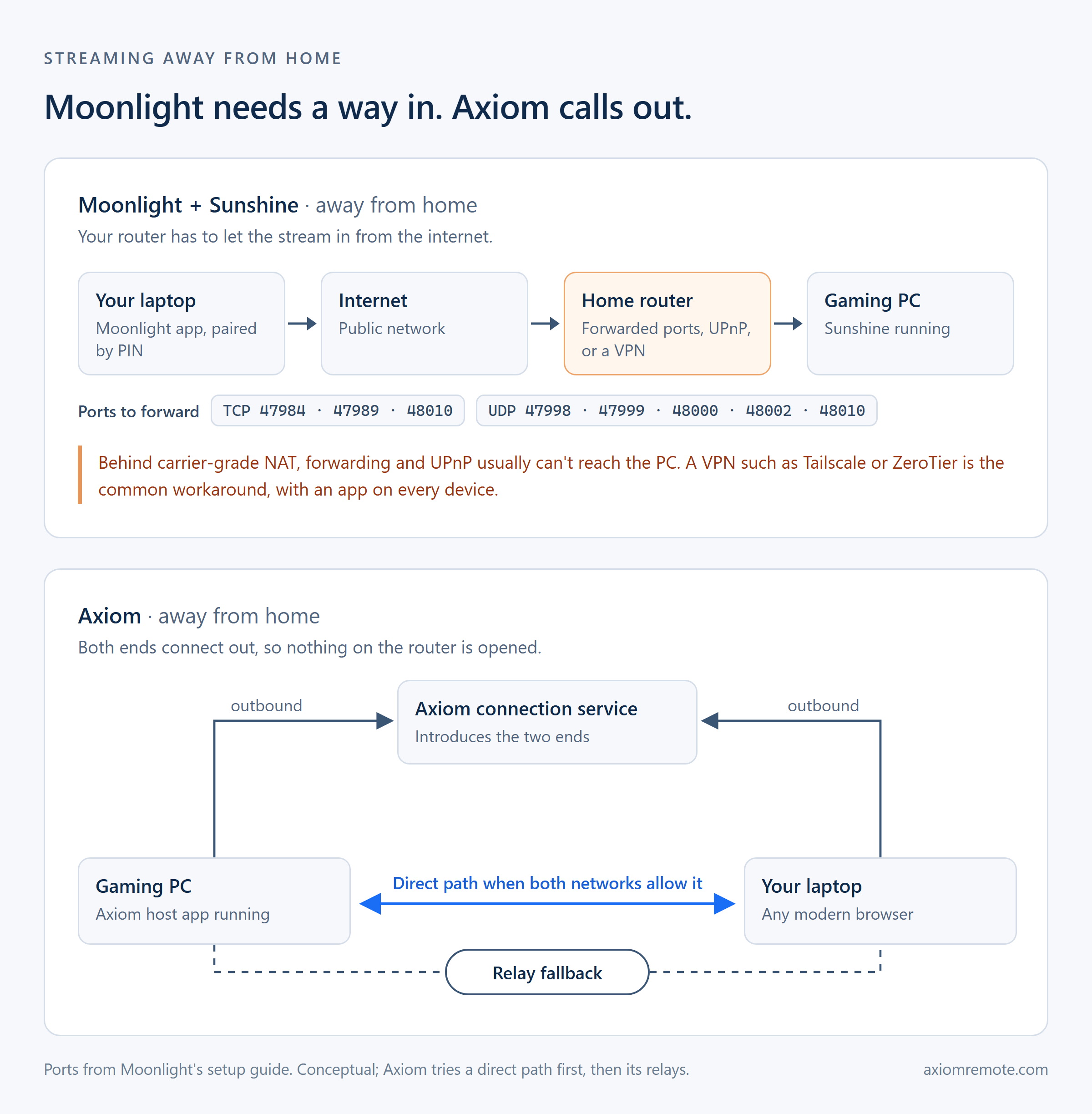
At home, Moonlight finds your gaming PC on its own. Leaving the house is where the work starts: your router blocks connections that begin on the internet, and a laptop at a friend's place or a phone on mobile data is exactly that.
Moonlight's setup guide gives three ways in. Forward TCP ports 47984, 47989, and 48010 and UDP ports 47998, 47999, 48000, 48002, and 48010 to the gaming PC. Turn on Sunshine's built-in UPnP option so a compatible router opens them for you. Or skip the router and put both devices on a private network with a VPN tool such as Tailscale or ZeroTier.
All three work, with trade-offs. Forwarding puts Sunshine's ports on the open internet, UPnP depends on your router supporting it, and a VPN adds another app to every device you play from. If your provider uses carrier-grade NAT, forwarding and UPnP usually can't reach your PC at all, which leaves the VPN.
Axiom turns the connection around. Your PC and the device you play from both connect out to Axiom, the way a browser loads a website, so nothing on your router has to accept incoming connections. When the networks allow it, the two talk directly; when they don't, Axiom's relay carries the encrypted stream.