
Skip to content
Your next workspace is a browser tab.Meet Axiom

Parsec alternative: Remote gaming and a real remote desktop. One tool, from any browser.

Parsec proved remote play could feel great. Axiom goes after the same goal browser-first, with a relay built in for the networks where peer-to-peer gives up.

Axiom vs. Parsec at a glance

Parsec is a mature, polished remote desktop that a lot of gamers love, and its free plan covers a lot. Here's how it compares with Axiom on the things that decide which one fits you. Parsec details come from its own site, pricing page, and support docs as of September 2026.

Axiom vs. Parsec at a glance
CostAxiom:Free personal tier planned; final pricing isn't set yetParsec:Free for personal, non-commercial use. Warp is $9.99 a month; team plans start at $30 per user a month.
AvailabilityAxiom:Invite-only early accessParsec:Available now
Computer you connect toAxiom:Windows onlyParsec:Windows 10 or later, or macOS 10.15 or later
Devices you connect fromAxiom:Any modern browserParsec:Apps for Windows, macOS, Linux, and Android, plus a web app for Chrome; no iPhone or iPad support
In a browserAxiom:The browser is Axiom's main clientParsec:A Chrome and Chromium web app that can't join Mac hosts; Parsec says it's less smooth and stable than the app
When a network blocks a direct connectionAxiom:Moves to Axiom's relay servers automaticallyParsec:Turn on UPnP or forward ports; Parsec's relay server comes with the Enterprise plan
Behind carrier-grade NATAxiom:Handled by the relayParsec:Connects if the other side is open enough; if both sides are behind it, you'll need a public IP from your provider
PictureAxiom:Gaming mode targets 1080p at 60fpsParsec:Up to 4K at 60fps, or up to 240fps at lower resolutions; 4:4:4 color on Warp
ControllersAxiom:Keyboard and mouse; controller passthrough on Gaming/Edge with a compatible host driverParsec:Gamepads supported
Playing with friendsAxiom:Not in the current buildParsec:Share a session so friends can join in
Desktop toolsAxiom:Clipboard and audio; terminal and monitor switching on eligible plans; file transfer unavailableParsec:Up to three monitors at once, virtual displays, and Wacom tablets on Warp

Sources: Parsec (official site) · Parsec plans and pricing · Parsec: hardware and software compatibility · Parsec: use the web app · Parsec: connection error codes -6023 and -6024

Which one should you use?

Stick with Parsec if…

  • You want it working today, and free for personal use.
  • You play with a controller, or want 4K or high-framerate streaming.
  • You want friends to join your game.
  • The computer you connect to is a Mac.
  • Peer-to-peer already connects fine on your networks.
Axiom is the better fit if…

  • You want to connect from any browser, or from a device where you can't install apps.
  • You're behind carrier-grade NAT or strict networks where peer-to-peer fails, and don't want to run your own relay.
  • You want everyday remote desktop tools, like files, terminal, and clipboard, in the same session as your games.

What happens when Parsec can't connect directly

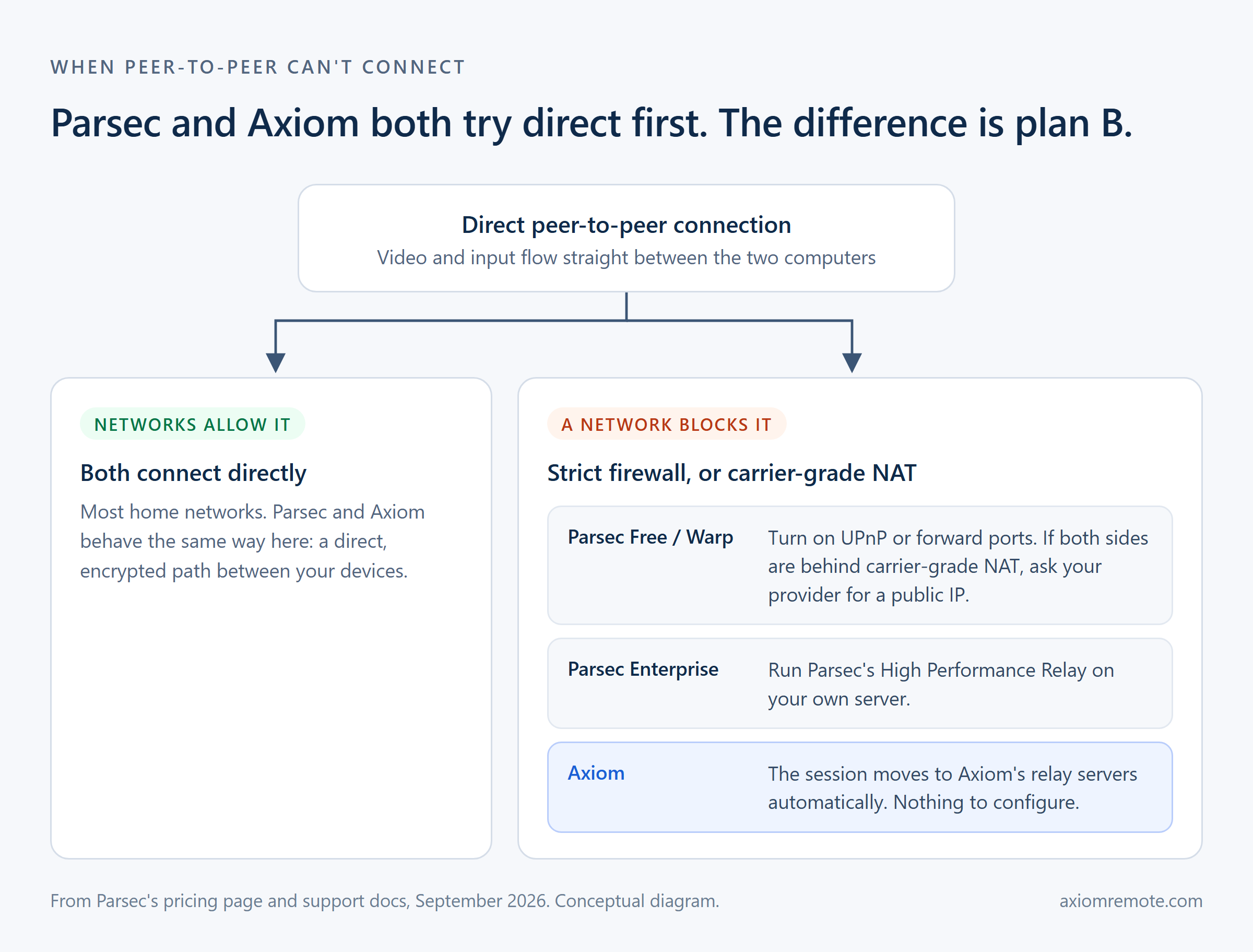
Parsec connects your devices peer-to-peer, so video and input travel straight between the two computers. On most home networks that works well, and it's a big part of why Parsec feels so responsive.

It does need the networks to cooperate. For home networks, Parsec's support docs recommend turning on UPnP in your router or forwarding ports by hand. Only one side needs to be open enough, so a single strict network is usually fine. If both sides sit behind carrier-grade NAT, which some internet providers use to share one public address across many homes, the docs point you to asking your provider for a public IP address.

For networks where peer-to-peer can't work, Parsec offers its High Performance Relay: a relay server you run yourself, included with the Enterprise plan at $45 per user a month, billed annually.

Axiom treats the strict network as the normal case. It tries a direct connection first, just like Parsec, and when a network blocks it, the session moves to Axiom's relay servers automatically. There's no router to change and no relay to run.

Diagram of what happens when a direct peer-to-peer connection is blocked. Parsec Free and Warp users turn on UPnP, forward ports, or get a public IP; Parsec Enterprise runs its own High Performance Relay; Axiom moves the session to its relay servers automatically.
Based on Parsec's pricing page and support docs, September 2026. Conceptual diagram.

How Axiom handles it

01

Install once, on the host only

Your PC gets a short connect ID. The devices you connect from need nothing but a browser.

02

Type the ID, enter the password

That's the whole connection flow, on any device that can open a web page.

03

Game or work — same session

Low-latency gaming mode when you play; files, clipboard, terminal, and multi-monitor when you don't.

The toolbar of a real Axiom browser session, with fullscreen, take control, gaming mouse, stats, cursor, controller status, keyboard, display selection, stream profile, clipboard, and audio controls.
The toolbar from a real Axiom session, captured in July 2026: gaming controls and everyday remote desktop tools in one place.
Axiom

What Axiom does differently

The browser is the client

Axiom is designed browser-first, so any modern browser is a full client and the device in your hands needs no install.

One tool for play and work

A complete remote desktop with a gaming mode, instead of a game streamer that tolerates desktop use.

Built for networks you don't control

Hotels, campuses, and carrier-grade NAT are the normal case for Axiom, handled by its relay rather than an error code.

No port forwarding, managed routing

Direct encrypted connections when networks allow, automatic relay when they don't. Nothing to configure on either side.

Parsec is a polished product with years of tuning, and this page makes no benchmark claims against it. The differences described are about design and access model.

Honest answers

Questions people actually ask

Can Axiom match Parsec's latency?

Parsec's low latency is real and earned. Axiom's gaming mode is built on the same principles — graphics-card video encoding and a dedicated input channel — and our early-access program exists to prove the numbers honestly per network and device rather than promise them on a landing page.

Does Parsec work in a browser?

Yes. Parsec has a web app for Chrome and other Chromium browsers. Its own docs say the web app can't join Mac hosts and isn't as smooth or stable as the downloadable app, and Parsec doesn't support iPhone or iPad, including Safari. Axiom is built browser-first.

Is Parsec free?

For personal, non-commercial use, yes. Warp adds up to three monitors, 4:4:4 color, and Wacom tablet support for $9.99 a month, and team plans start at $30 per user a month billed annually.

Does Axiom support co-op / letting a friend join my game?

Shared-control sessions like Parsec's party mode aren't in the current build. Full remote control of your own PC is. If couch co-op over the internet is your main use, tell us on the waitlist — demand moves the roadmap.

Can I use Axiom today?

Axiom is in early access. Join the waitlist and tell us what you want to connect from and to — we invite small groups of testers every week, starting with people whose setup we can support well.

How much will Axiom cost?

Personal use will stay generous and there will be a free tier. Early testers get launch discounts. Final pricing is not locked yet, and we will not surprise the waitlist with it.

Keep the gaming. Add the rest of your desktop.

Join the waitlist and mention you're a Parsec user — switchers tell us exactly where the bar is.

Product updates and beta invitations only. Unsubscribe anytime.
