
How Do You Access Your Work Computer From Home Securely?
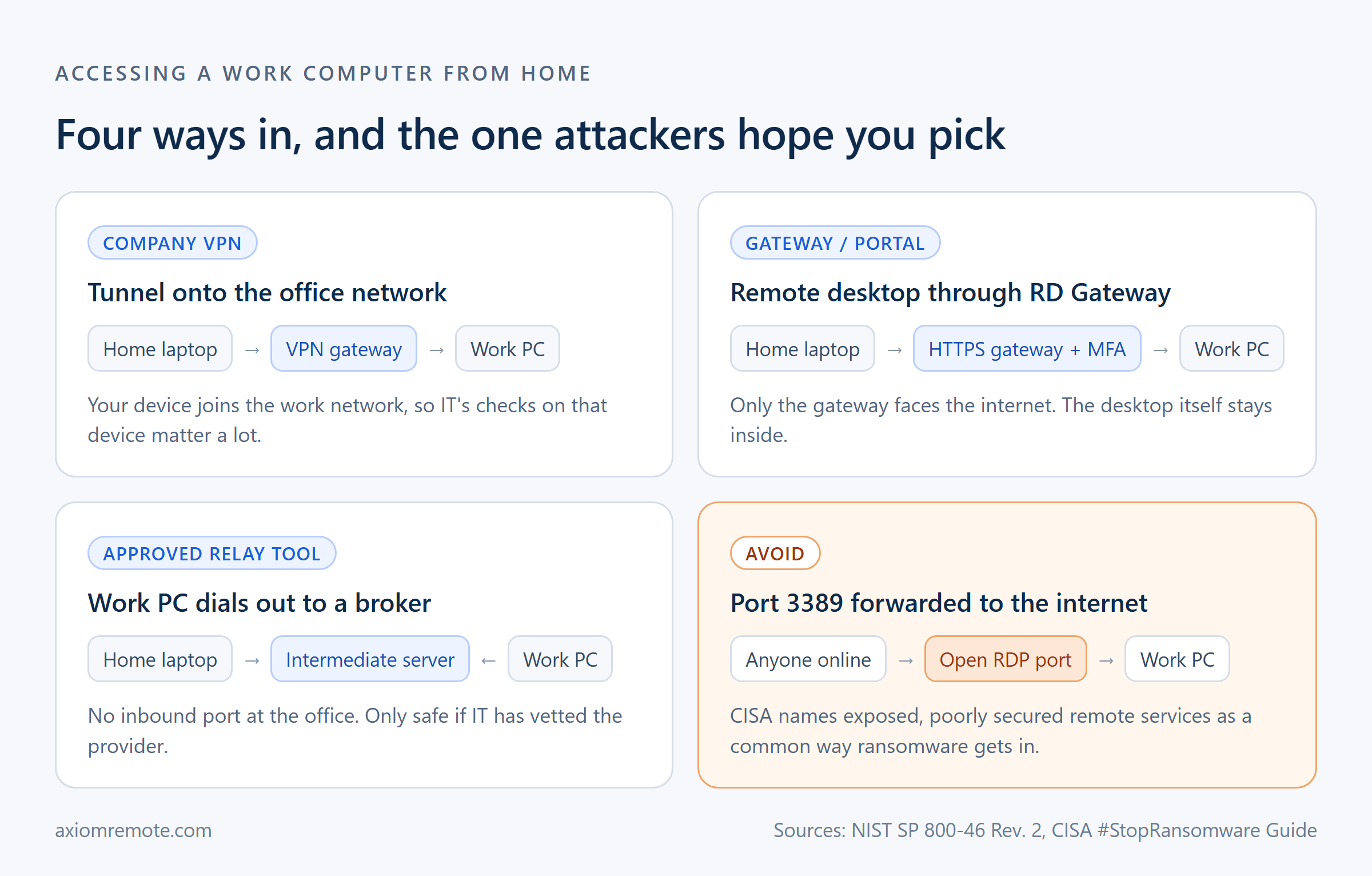
What is the safe way to get to your work computer from your couch? The honest answer is that the secure way is almost always the one your IT team already runs, whether that's a company VPN, a Remote Desktop Gateway sitting in front of the office, or a remote access tool they've vetted and approved for that exact machine. The one thing you should never do is open the work PC's remote desktop port to the internet so you can reach it directly, because exposed remote desktop is one of the most common ways attackers get into a network in the first place. Everything else comes down to two things, which are keeping the office side closed to the outside world and treating your own home setup as if it's hostile, and once you understand why, picking the right path gets a lot easier.
Why can't you just turn on Remote Desktop and connect from home?
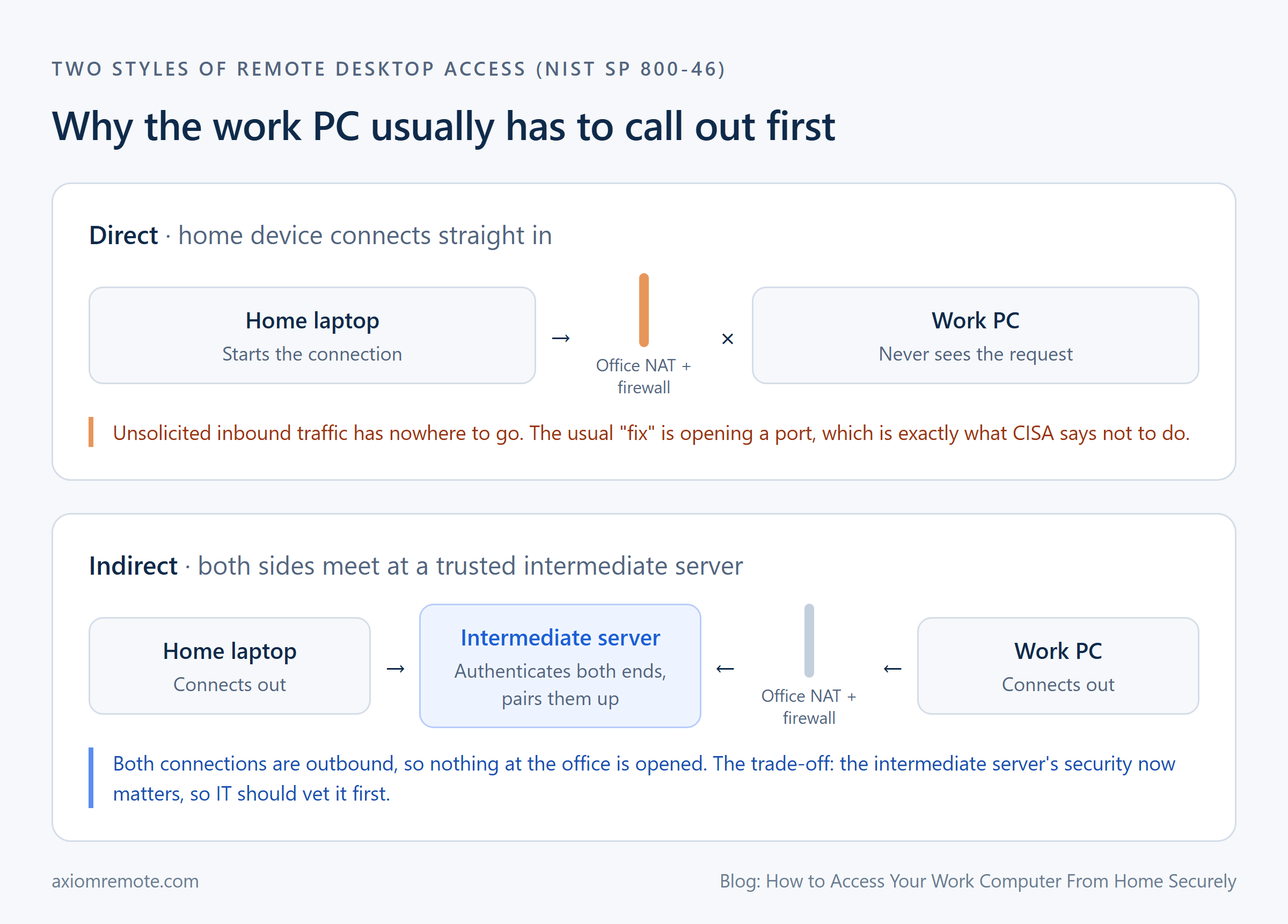
Most people's first idea is to flip on Remote Desktop on the work PC, look up the office's public address, and connect. The problem is that this almost never works, and when somebody does make it work, it's usually by doing the exact thing they shouldn't. NIST's telework guide (SP 800-46) explains that direct remote desktop access "is often not possible because it is prevented by many firewalls," and that if the work PC sits behind NAT, the home device "cannot initiate contact" with it unless the NAT allows it or the work PC reaches out first. This shows how the office network is doing its job, because it's built to ignore connections nobody inside asked for.
So the shortcut people find online is port forwarding, which means telling the office router to send outside traffic on the remote desktop port straight to your PC. That does get you in, but it also lets everybody else on the internet knock on the same door, all day, every day. If you want the longer version of why that's such a bad trade, we wrote about it in our post on port forwarding risks, but the short version is that you'd be turning your work PC into a public login page.
What do security agencies actually say about remote desktop?
CISA's #StopRansomware Guide is about as blunt as a government document gets. It says to "not expose services, such as remote desktop protocol, on the web," and it explains that attackers "often gain initial access to a network through exposed and poorly secured remote services." It also tells organizations to limit the use of RDP and other remote desktop services, and when they are needed, to close unused ports, lock accounts after repeated failed attempts, turn on multifactor authentication, and log every login attempt.
What this means for you is pretty simple. Remote desktop itself isn't evil, and plenty of companies use it every single day, but it should only ever be reachable through something that checks who you are before the desktop is even in reach. If your plan involves the work PC's login screen being visible to the whole internet, it's the wrong plan, no matter how strong you think your password is.
What are the secure options for reaching a work PC?
One option is the company VPN. A VPN puts your home device onto the office network through an encrypted tunnel, and from there you connect to your work PC the same way you would at your desk. It works well, but it also means your laptop is now sitting on the work network, which is why IT tends to be picky about which devices are allowed to join, and that pickiness is a feature, not a hassle.
Another option is a Remote Desktop Gateway. Microsoft describes RD Gateway as the piece that "grants users on public networks access" to Windows desktops, and it uses an encrypted HTTPS connection so only the gateway faces the internet while the desktops stay inside. This is a clear example of keeping the office closed, since the gateway can demand multifactor authentication and enforce rules about who can reach which machine before any desktop session starts.
The third option is a remote access tool where the work PC connects outward to a broker server and you meet it there. NIST calls this indirect remote desktop access, and it's the reason those tools work without anybody opening a port. But NIST also warns that the intermediate server's security "is very important," and says an organization should evaluate the provider before using one. This shows how the tool being convenient isn't the same as it being approved, which is why this option belongs to IT to choose, not to you.
Why does the direction of the connection matter so much?
This is the part that clicked for me when I first started building remote access software. A firewall is great at blocking connections that come in from outside, and pretty relaxed about connections that start from inside, because that's how every web page you visit works. A tool where the work PC dials out to a broker uses that same rule, so the office never has to accept a stranger's connection at all.
The trade-off is that the broker in the middle now matters a lot, since it's the thing deciding whether you are really you. That's why the questions to ask about any tool like this are about the middle, which are how it authenticates both ends, whether the session is encrypted between the two computers, and whether it supports the sign-in rules your company already uses. If you're curious how the two computers actually find each other once they've both dialed out, our explainer on NAT traversal walks through it.
How do you keep the home side of the connection safe?
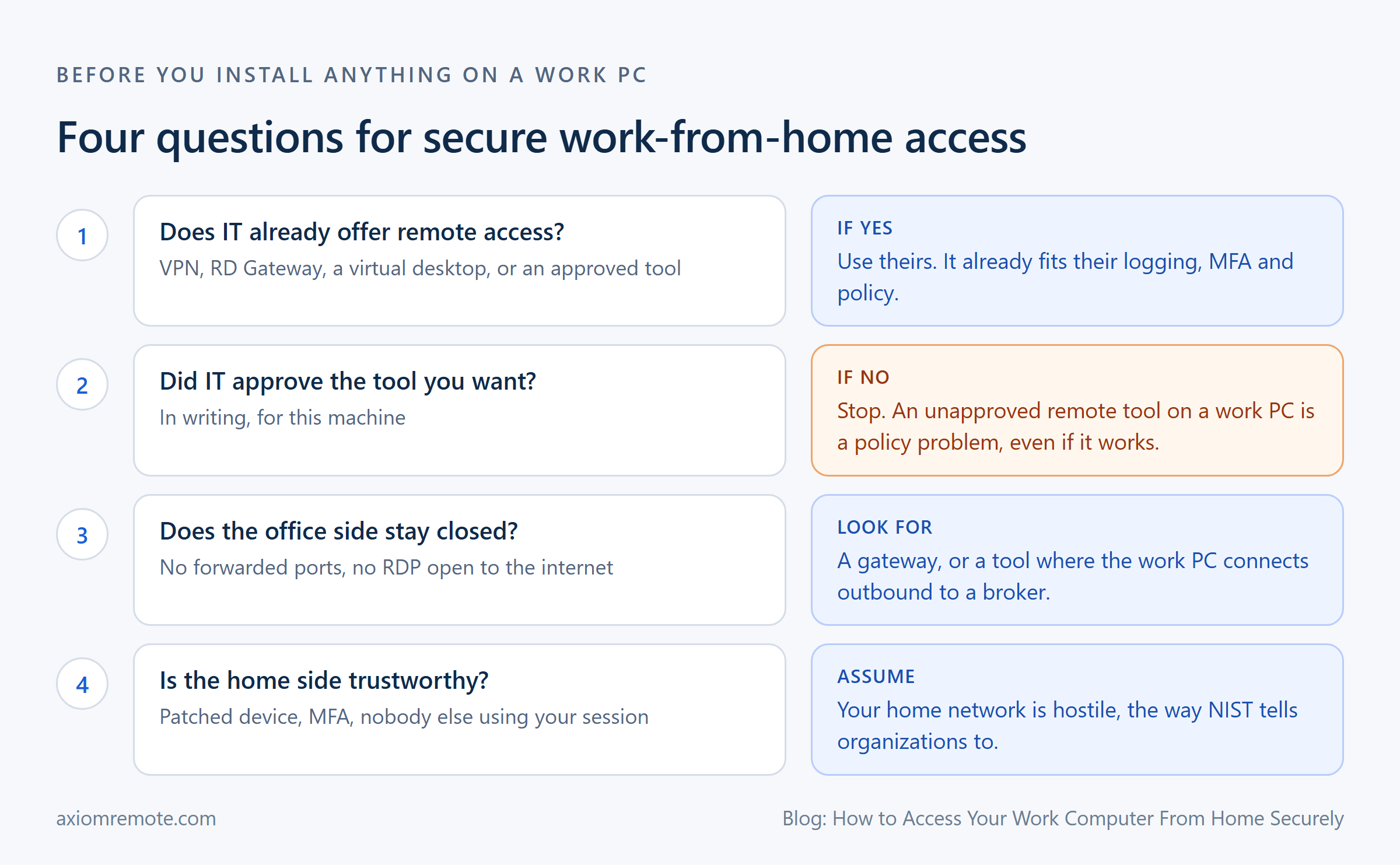
Even a perfect office setup can be undone from the couch. NIST tells organizations to plan their telework security "based on the assumption that external environments contain hostile threats," and to assume home devices will eventually get lost, stolen, or infected. That sounds dramatic, but it's really just being realistic about a laptop that also gets used for games, school, and whatever a younger sibling decided to download.
In practice that means a few boring habits that matter more than any setting. Keep the device you connect from fully updated, use multifactor authentication on every work login, don't save work files onto your personal computer if the session lets you avoid it, and lock or disconnect the session when you walk away. For the most part, the person most likely to see your work screen at home is somebody in your own house, so a locked screen is more than enough reason to build the habit.
What should you ask IT before you set anything up?
Start with whether they already offer remote access, because most companies do, and using theirs means it already fits their logging, their sign-in rules, and their policies. If they don't, ask before installing anything on the work PC yourself. Putting an unapproved remote access tool on a company computer can break policy even if it's perfectly secure, and some security teams treat surprise remote access software as a red flag on its own, since attackers love installing it too.
If you do get the green light to bring your own tool, the checklist is short. Make sure nothing at the office is opened up to the internet, make sure sessions are encrypted, make sure the sign-in is stronger than a single password, and make sure IT knows the tool is on that machine. Even though this is slower than just figuring it out yourself, it's definitely better than explaining to your boss why the work PC showed up in a security report.
Common questions
Is it safe to use Remote Desktop to access my work computer from home?
It can be, as long as the work PC's remote desktop port is not exposed directly to the internet. CISA advises against exposing RDP on the web. Safe setups put it behind a company VPN or a Remote Desktop Gateway with multifactor authentication, or use an approved tool where the work PC connects outward.
Do I need my employer's permission to remote into my work computer?
Yes, you should always get it. Most companies already offer an approved way in, and installing your own remote access software on a work PC can break company policy even if it is secure. Ask IT what they support before setting anything up.
What is the difference between a VPN and an RD Gateway for working from home?
A VPN puts your home device onto the office network through an encrypted tunnel, so you can reach many internal resources. An RD Gateway only brokers remote desktop sessions over HTTPS, so your device reaches specific desktops without joining the whole network. Both keep the work PC itself off the public internet.
Axiom
Remote access that never opens a port
Axiom connects from any browser to a Windows PC with no port forwarding or router setup, keeps sessions encrypted, and falls back to our relay servers when a network blocks the direct path. It's in invite-only early access, and for a work machine, check with your IT team first.