
Parsec Error -6023: What It Means and How to Fix It
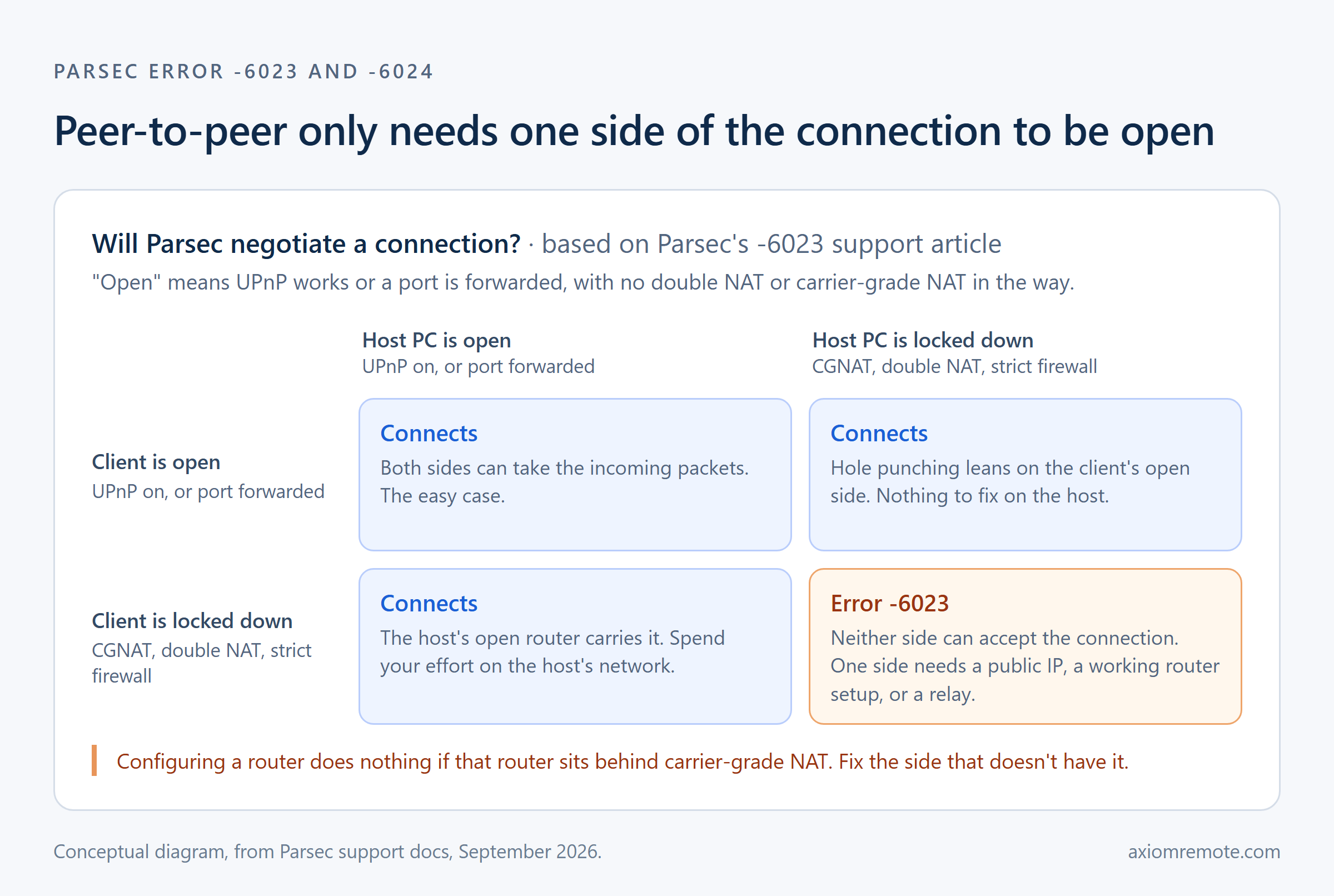
Parsec error -6023 (and its sibling -6024) means Parsec couldn't build a peer-to-peer connection between your two computers, because something on the network path stopped the packets from getting through. Parsec's own support article names the usual suspects: NAT problems, a firewall, missing port forwarding, or an internet provider blocking UDP. The good news is that only one of the two computers has to be open enough for the connection to work, so the fix is almost never "fix everything." It's finding out which side is stuck, reading the second error code Parsec shows next to -6023, and then fixing the side that can actually be fixed, which is exactly what this guide walks through.
What does Parsec error -6023 actually mean?
Parsec is a peer-to-peer tool, which means the video and your mouse movements travel straight between the host PC and the device you're connecting from instead of passing through a server in the middle. That direct path is a big part of why Parsec feels so quick. But a direct path needs both routers to let the traffic in, and a home router's whole job is to throw away packets it wasn't expecting. When Parsec runs out of ways to get the two machines talking, it gives up and shows -6023, which its support page describes as being unable to negotiate a successful connection.
The one detail that changes how you should troubleshoot this is buried in the middle of Parsec's article. The docs say the app "only needs one of the machines to be sufficiently open" to make the connection. This shows how most people waste their time on this error: they tear apart the network that's actually hopeless, when the other side would've taken five minutes to open up. So before you touch anything, it's worth figuring out which of the two networks is the locked one.
How do you read the second error code next to -6023?
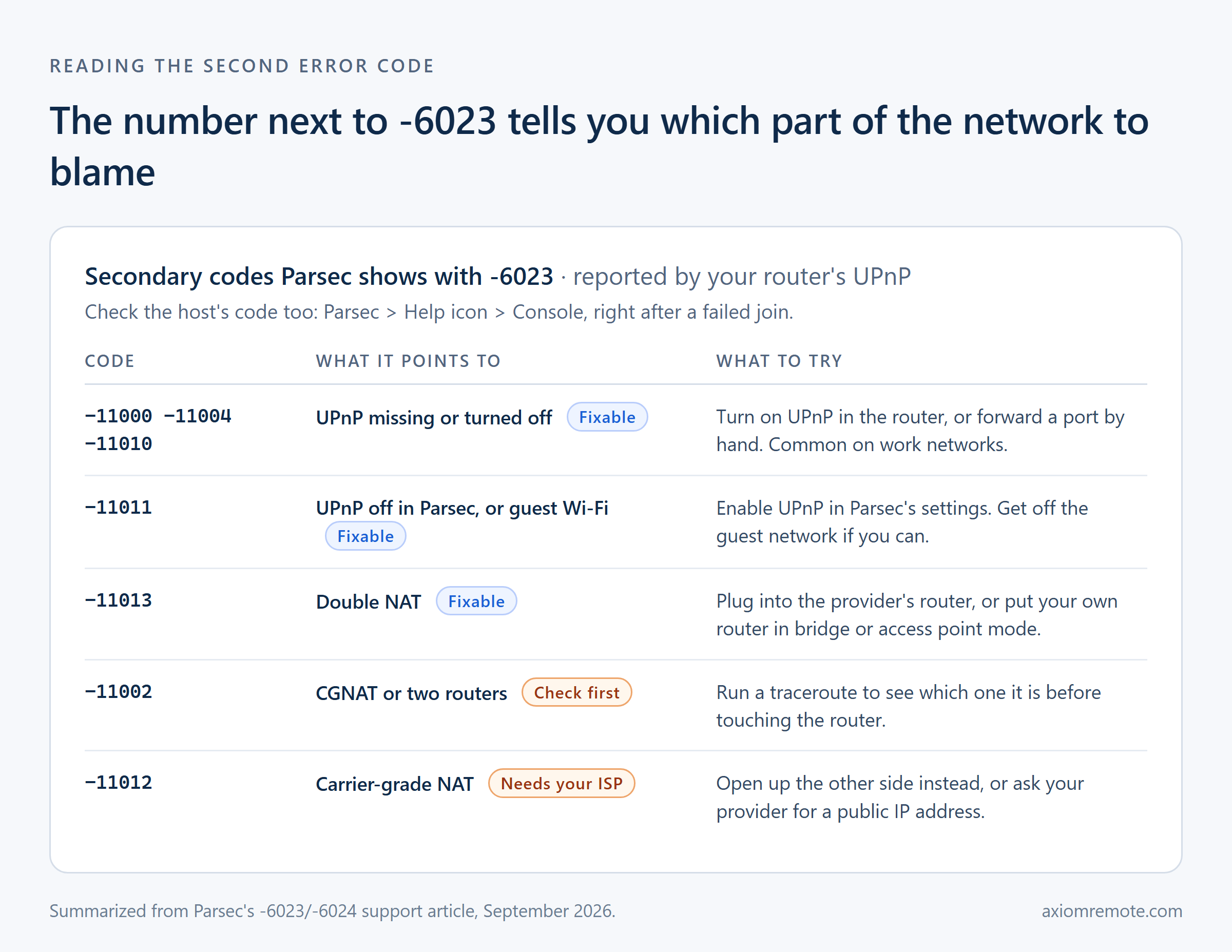
Starting in Parsec version 150-99, the app can show a second code next to -6023, and this number comes from what your router's UPnP told Parsec about why the connection failed. UPnP is the feature that lets an app ask the router to open a port for it automatically, and it's usually on in home routers and off on work networks. That second code is honestly the most useful thing on the screen, because it points at one specific part of the network instead of leaving you to guess.
The UPnP group, -11000, -11004 and -11010, means UPnP is missing or turned off, which you fix by turning it on in the router or forwarding a port by hand. The code -11011 means UPnP is turned off inside Parsec's own settings, or that you're on a guest Wi-Fi network that won't allow it. The code -11013 points to a double NAT, which is two routers stacked on top of each other. And then there are the two nasty ones, -11002 and -11012, which point to carrier-grade NAT, where the router you'd configure isn't really the one facing the internet.
One more thing a lot of people miss is that the host has its own code too. Parsec's docs say you can find it on the host under Parsec, then the Help icon, then Console, right after someone fails to join. Checking both machines tells you which side is the problem, which is more than enough to decide where to spend your effort.
What fixes -6023 on a normal home network?
Start with the boring stuff, because it's boring for a reason. Restart both computers and both routers, then make sure Parsec is allowed through the firewall on both machines, which on Windows lives in the classic Control Panel under "Allow an app or feature through Windows Defender Firewall." If you're on a Mac running macOS Sequoia, there's also a newer Local Network permission under Privacy and Security that Parsec needs, and if you clicked "Don't Allow" on that popup once, the connection will quietly fail from then on.
Next, look for a second router. This happens constantly: somebody buys a nicer Wi-Fi router and plugs it into the one the internet provider gave them, and now there are two layers of NAT between the PC and the internet. Parsec's fix is to plug your device into the provider's router directly, or switch your own router into bridge or access point mode so it stops doing NAT. Once that's sorted, turn on UPnP in the router, and if that still doesn't work, forwarding a port manually is the last step. Parsec's port forwarding guide is pretty honest that this is time-consuming with room for error, and that it only helps if there's no double NAT or CGNAT in the way. Port forwarding also leaves a door open on your network, which is its own trade-off I wrote about in the port forwarding risks post.
How do you tell if you're behind carrier-grade NAT?
Carrier-grade NAT, or CGNAT, is when your internet provider shares one public address across a whole bunch of customers, so your router's "outside" address is really just another private address inside the provider's network. Nothing you do on your own router can fix that, because the thing blocking your incoming traffic belongs to the ISP. It's also getting more common, especially on fixed wireless, satellite, and a lot of newer fiber providers.
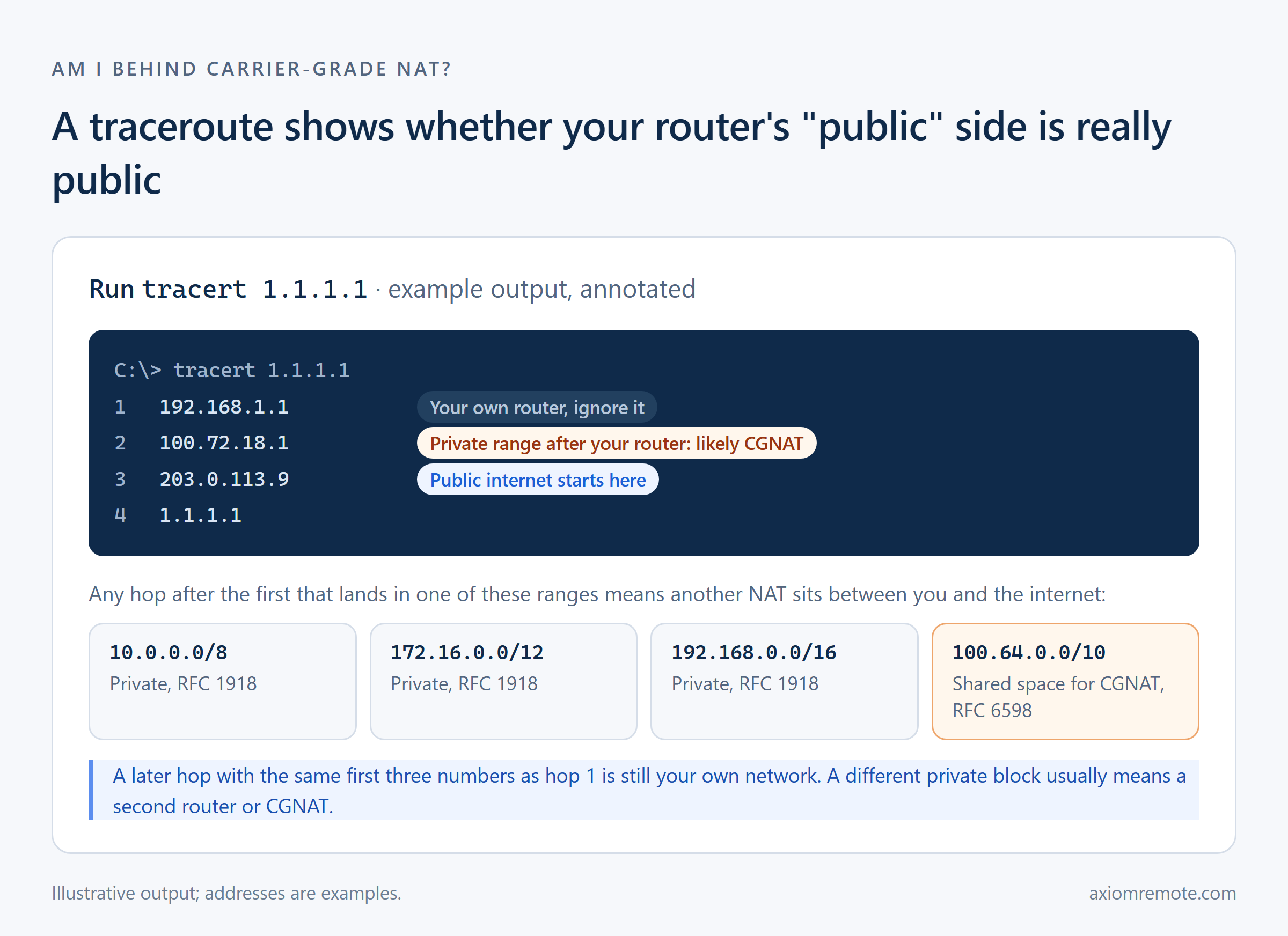
Parsec's check for this is a traceroute. On Windows you press Windows key and R, run cmd /k tracert 1.1.1.1, and wait for it to finish. Then you look at every hop after the first one. If any of them fall inside the private ranges from RFC 1918 (10.x, 172.16 through 172.31, or 192.168.x) or inside 100.64.0.0/10, which RFC 6598 set aside specifically as shared address space for carrier-grade NAT, then there's another NAT between you and the internet. The exception, like Parsec's article points out, is a hop that starts with the exact same first three numbers as your router, since that's still your own home network.
This is a clear example of why the order matters. If hop two is a 100.64 address, you can stop fiddling with that router completely, because the fix has to happen somewhere else.
What if both sides are behind CGNAT or a strict network?
If only one side is stuck behind CGNAT, Parsec's advice is to open up the other side, which usually means UPnP or a forwarded port on the network that has a real public address. If both sides are stuck, the docs say one of you needs to ask your internet provider for a public IP, which they describe as often free or inexpensive. That works, but it depends entirely on your provider saying yes, and some of them just won't.
Past that, the options get heavier. Parsec suggests ZeroTier, a peer-to-peer VPN, as a last try, while being upfront that it's not a guaranteed fix and can add latency. For teams, Parsec's answer is its High-Performance Relay, which is a relay server you run yourself and which comes with the Parsec for Teams Enterprise plan. The idea behind any relay is the same: when two machines can't reach each other directly, they both connect out to a server that passes the traffic along. I went through how that detour works in more detail in the relay server explainer.
In my experience this is where the frustration really comes from. The error isn't Parsec being broken, it's the internet being built in a way that assumes you'll never want your home PC to accept a connection. Once you know which side is locked and why, -6023 stops being a mystery and becomes a pretty short checklist.
Common questions
What's the difference between Parsec error -6023 and -6024?
Parsec groups them together in one support article under the same heading, unable to negotiate a successful connection, and the fixes are the same for both. Either way, the peer-to-peer connection between the two machines never got established, so you work through the same checklist: firewall, double NAT, CGNAT, then router settings.
Do I need to fix -6023 on both computers?
No. Parsec's docs say the app only needs one of the two machines to be open enough, thanks to UDP hole punching. Check the secondary code on both the client and the host, then fix whichever side isn't behind carrier-grade NAT, since that's the side where router changes can actually help.
Is Parsec error -6023 the same as -6013 or -6101?
No. Parsec says -6013 means your network is blocking UDP altogether, which is common on work and school networks, and -6101 means your computer can't reach Parsec's authentication servers over TCP port 443. Error -6023 means the app reached Parsec fine but couldn't build the direct connection between the two computers.
Axiom
Stuck on a network you can't change?
Axiom tries a direct connection first and moves to its own relay servers automatically when a network blocks it, so CGNAT and strict Wi-Fi don't need a router change or a public IP. You connect from any modern browser. It's in invite-only early access, so join the waitlist if you want in.