
How Does NAT Traversal Work? STUN, TURN, and ICE Explained
NAT traversal is the set of tricks that lets two devices, each hidden behind its own router, open a connection straight to each other without anyone forwarding a port. It works in three moves: each device asks a STUN server what its public address looks like, both sides trade those addresses through a coordination server, and then they send packets at each other at the same time so both routers think the traffic is a reply to something they asked for. When that fails, a TURN relay carries the traffic instead, and a protocol called ICE is the referee that tries every option and picks the most direct one that actually works. Most people never think about any of this until a connection refuses to go through, which is why it's worth understanding how the whole thing fits together.
Why can't two devices behind routers just connect to each other?
Your router is doing something called network address translation, and it's the reason you have a problem in the first place. Every device in your house has a private address that means nothing on the open internet, and the router swaps that private address for its one public address on the way out, remembering who asked for what so it can send the answers back to the right device. This is a perfectly good system for browsing, because your laptop always speaks first and the router always knows where the reply belongs. But a remote desktop connection flips that around, since the PC at home needs to accept traffic it never asked for, and a router has no idea which of the devices behind it an unexpected packet is meant for, so it just drops it.
The old fix is port forwarding, where you tell the router ahead of time that anything arriving on a certain port goes to one specific PC. It works, but it means logging into router settings, it leaves a door open to the whole internet, and it does absolutely nothing if your internet provider has put you behind carrier-grade NAT, where the address you'd forward isn't even yours. This shows how the real problem isn't the remote desktop software at all. It's that both ends are sitting behind a doorman who only lets in people who were invited, and neither side knows how to send the invitation.
What does a STUN server actually do?
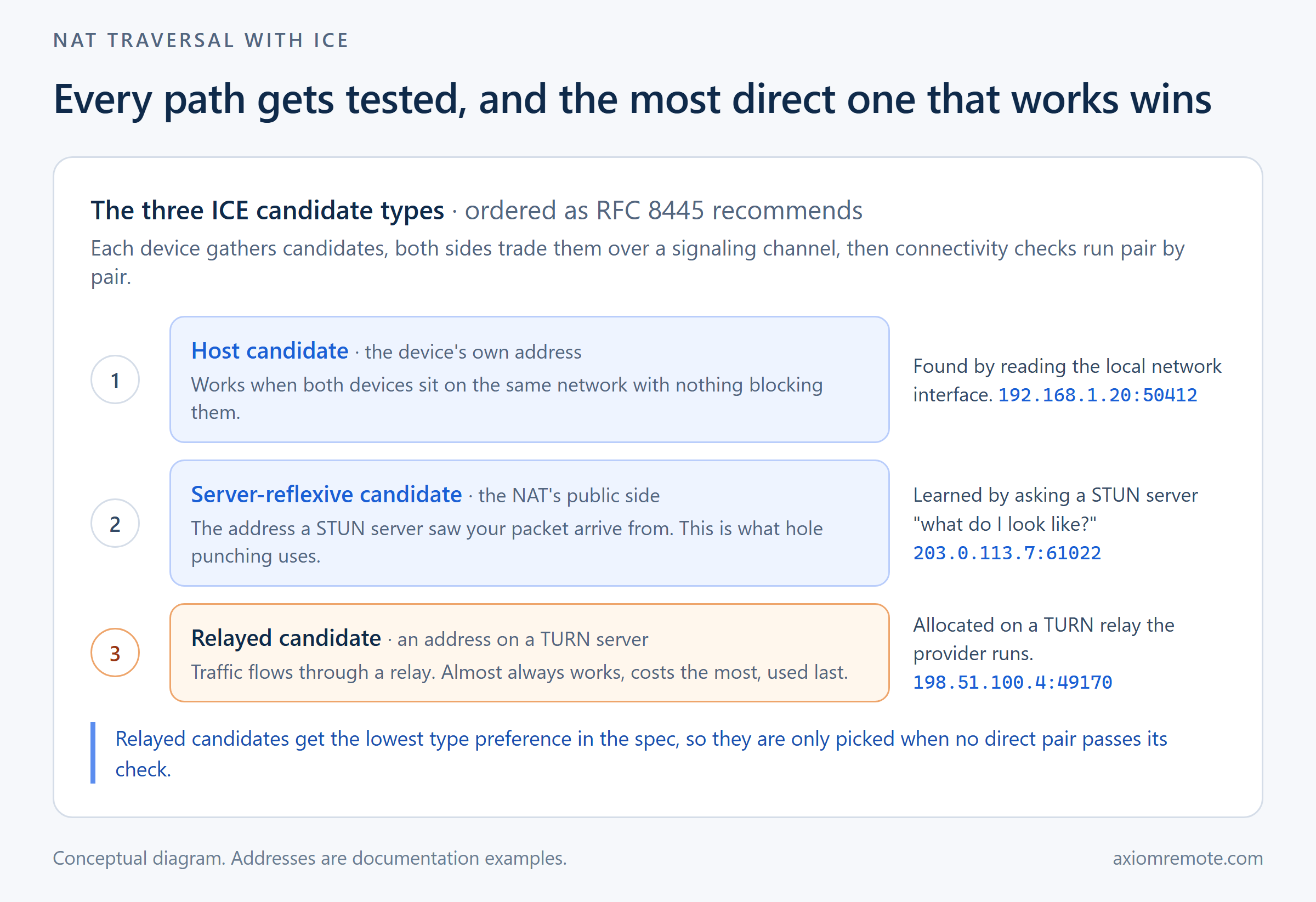
STUN is the first piece, and it's surprisingly simple. A device sends one small request to a STUN server out on the public internet, and the server just writes back the address and port the request appeared to come from. That answer is the public face your router gave you for that conversation, and in ICE terms it's called a server-reflexive candidate, which is a fancy name for "what I look like from outside." The STUN server never carries your actual session, it just holds up a mirror.
What this means for you is that STUN is cheap and fast, which is why almost every real-time tool uses it, from video calls to game streaming to browser-based remote desktop. But knowing your own public address only helps if the other device can actually use it, and that depends entirely on how your router behaves, which is where hole punching comes in.
How does UDP hole punching get through two routers at once?
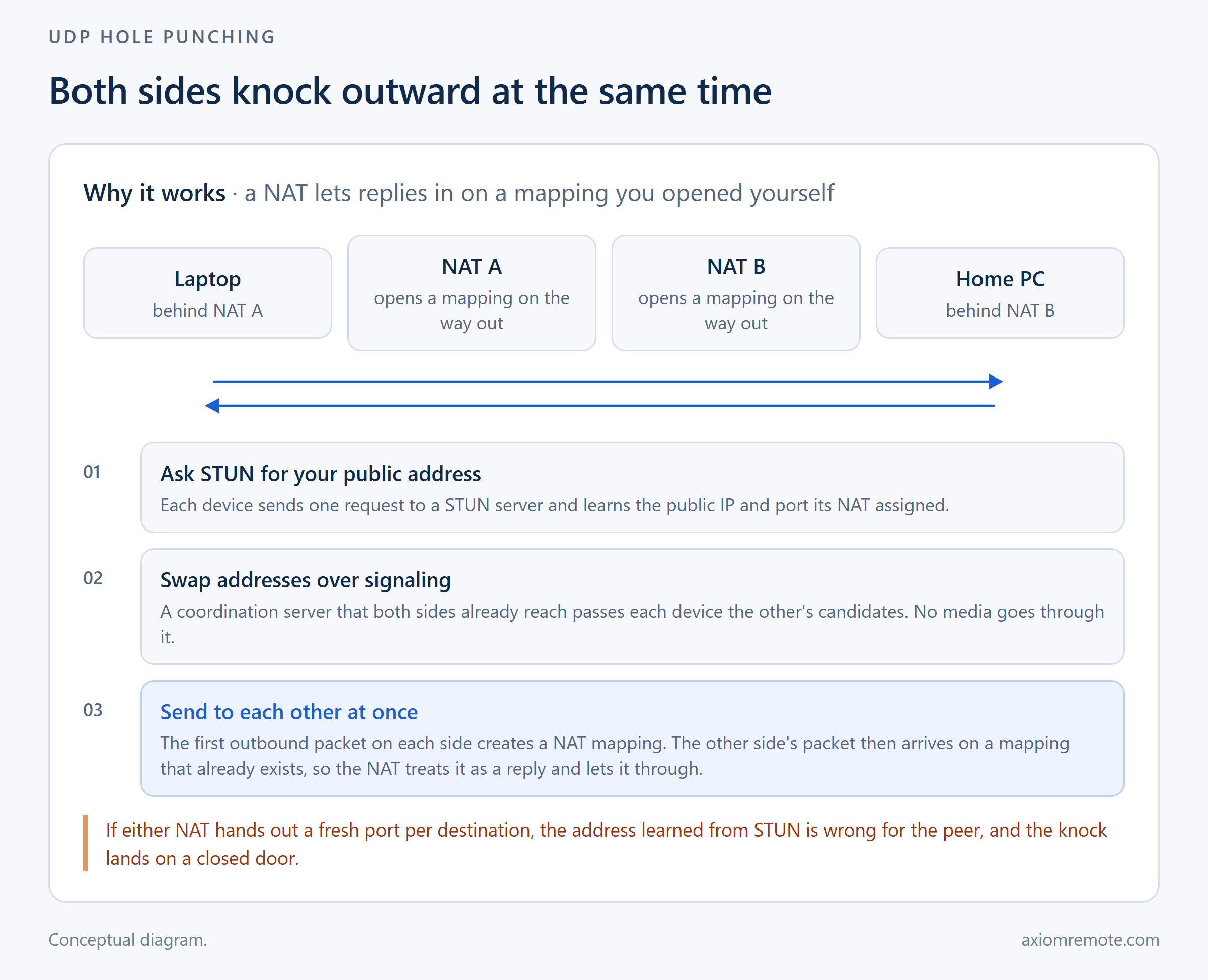
Once both devices know their public addresses, they swap them through a signaling server that both of them are already connected to. Then comes the clever part: both sides start sending packets to each other's public address at roughly the same moment. The laptop's first packet goes out through its router, and that outgoing packet creates a mapping, basically a note that says "expect replies from this address." The home PC does the exact same thing on its end. So when the laptop's packet finally reaches the home router, the router checks its notes, sees a mapping that its own PC just opened toward that exact address, and lets it through as if it were a reply.
This is a clear example of using the router's own rules against it, in a completely legitimate way. Nobody configured anything, no port was opened ahead of time, and both routers are just doing their normal job of letting replies back in. That's how a lot of modern remote access tools can say no port forwarding is needed, because when hole punching works, the connection goes straight from one device to the other with nothing in the middle.
Why does hole punching fail on some networks?
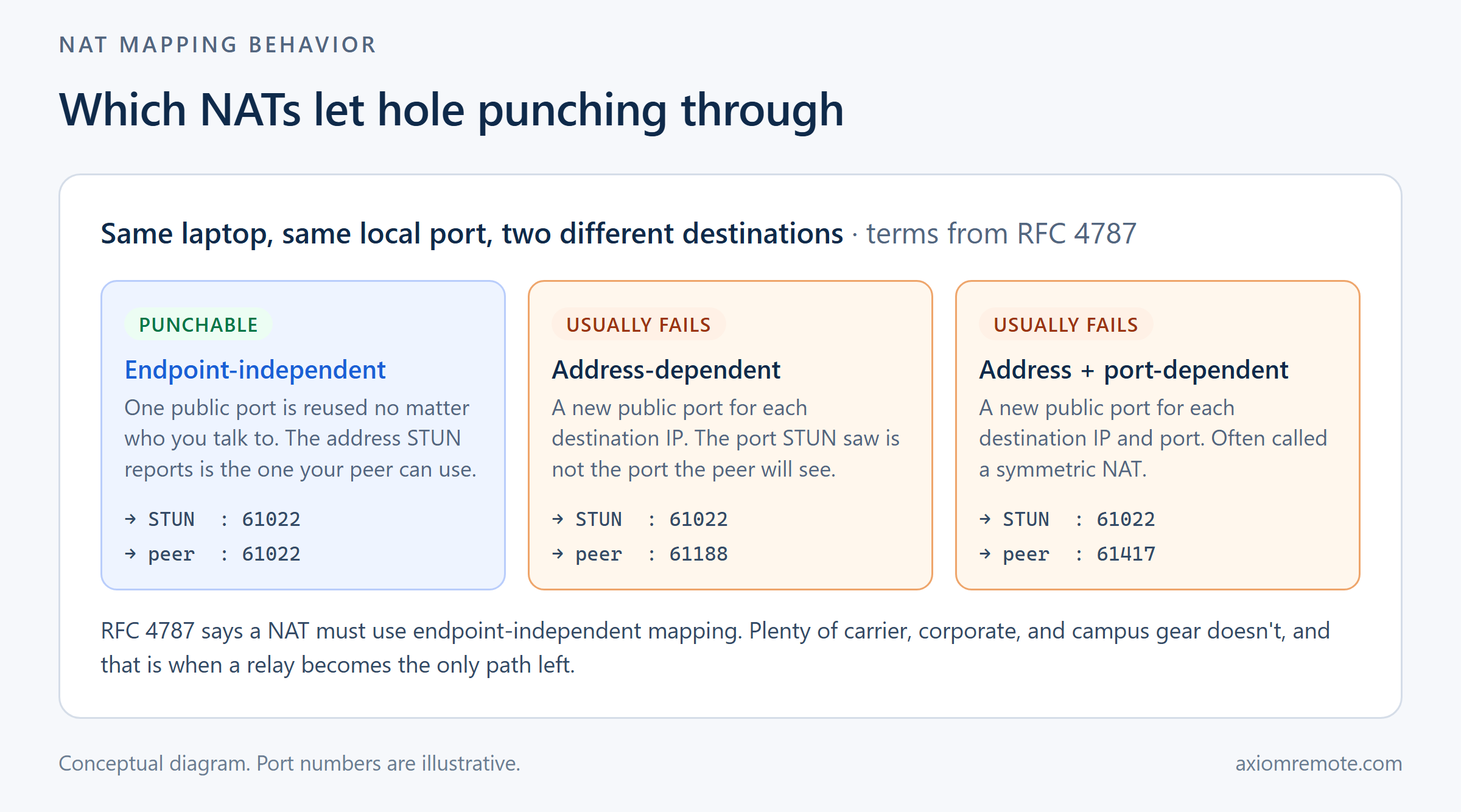
Hole punching depends on one assumption, which is that your router uses the same public port no matter who you're talking to. The IETF actually wrote this down as a rule in RFC 4787, which says a NAT "MUST have an 'Endpoint-Independent Mapping' behavior," and it goes on to explain that failing this forces the use of a relay. This shows how much the whole system depends on routers following the rules. If your router reuses one port for everyone, the address the STUN server saw is the same address your peer will see, and the knock lands on an open door.
The trouble is that plenty of routers don't follow that rule. Some hand out a brand new public port for every different destination, which the spec calls address-dependent or address-and-port-dependent mapping, and people usually just call a symmetric NAT. With one of those in the path, the port the STUN server reported is completely useless to your peer, because the router picks a different one the moment you talk to anybody else. The TURN specification, RFC 8656, says it directly: hole punching "will fail if both hosts are behind NATs that are not well behaved." In my experience this is exactly what you run into on corporate networks, campus Wi-Fi, some mobile carriers, and a lot of CGNAT setups, and it's why a tool that only does hole punching will just hang on those networks.
What is a TURN server, and why is it the last resort?
TURN is the backup plan for when no direct path exists. Instead of trying to connect the two devices to each other, each one connects outward to a relay server on the public internet, which every network allows, and the relay passes the traffic back and forth between them. RFC 8656 is honest about the trade-off, saying that relaying is "very likely to work" but "comes at a high cost to the provider" because the server needs a high-bandwidth internet connection to carry everyone's traffic. That's why nobody uses TURN first.
For you, a relay usually means a slightly longer path, since the packets take a detour through a server instead of going straight across, and how noticeable that is depends a lot on where the relay sits compared to you and your PC. But a working connection with a small detour is definitely better than no connection at all, which is the only other option on a network that blocks the direct route. If you want the longer version of how relays fit into remote desktop, the relay server explainer goes into more detail.
How does ICE decide which path to use?
ICE, defined in RFC 8445, is the protocol that ties all of this together, and it's what WebRTC uses under the hood in every modern browser. Each device gathers a list of candidates, which are every address it could possibly be reached at: its own local address, the public address it learned from STUN, and an address on a TURN relay. Both sides swap their lists, pair them up, sort the pairs by priority, and then run connectivity checks down the list. The spec gives relayed candidates the lowest preference of all, calling them a last resort, so a relay only gets picked when every direct option has already failed its check.
This means you don't have to know which kind of network you're on, because ICE figures it out for you in the first moments of connecting. On the same home network the local address wins, on two normal home routers hole punching usually wins, and on a strict hotel or campus network the relay wins. That's roughly how Axiom handles it too, connecting directly when networks allow and falling back to its relay servers when a network blocks the direct path, which is the same idea behind remote desktop without port forwarding. Knowing that there are only three kinds of path, and that the software tries them in order, makes it a lot easier to understand why a connection feels different at home than it does at a coffee shop.
Common questions
Is NAT traversal the same thing as port forwarding?
No. Port forwarding is a permanent rule you set on your router so outside traffic on one port always goes to one device. NAT traversal needs no router changes at all, because both devices open the path themselves by sending traffic outward first, and the routers let the replies back in.
What is the difference between STUN and TURN?
STUN only tells a device what its public address looks like so it can try a direct connection, and it never carries your session. TURN is a relay that actually carries the traffic between two devices when a direct connection can't be made, which makes it far more reliable on strict networks but much more expensive to run.
Why does my remote desktop connect at home but not on work or campus Wi-Fi?
Home routers usually reuse one public port for every destination, so hole punching works. Corporate, campus, and some carrier networks often use symmetric NAT or strict firewalls that break hole punching, so the connection only works if the tool can fall back to a relay server.
Axiom
Remote desktop that finds a path on its own
Axiom connects straight to your Windows PC when the network allows it and falls back to its own relay servers when it doesn't, with no port forwarding or router settings to touch. You connect from any modern browser with a short connect ID. It's in invite-only early access right now, so join the waitlist to get in and pick up a launch discount.