
What Causes Input Lag in Remote Game Streaming?
Input lag in remote game streaming is not one delay, it's a stack of small ones. When you click, that input has to travel to the host PC, the game has to react and draw a new frame, Windows has to hand that frame over, the encoder has to compress it, the video has to cross the network, your device has to buffer and reassemble the packets, decode them, and then wait for your screen to refresh. Every one of those steps costs a little, and the lag you actually feel is all of them added together. The good news is that most of the extra delay people complain about comes from just three places, which are encoder buffering, an unstable network forcing the client to buffer more, and input getting stuck behind other traffic, and every one of those can be fixed once you know which one you're dealing with.
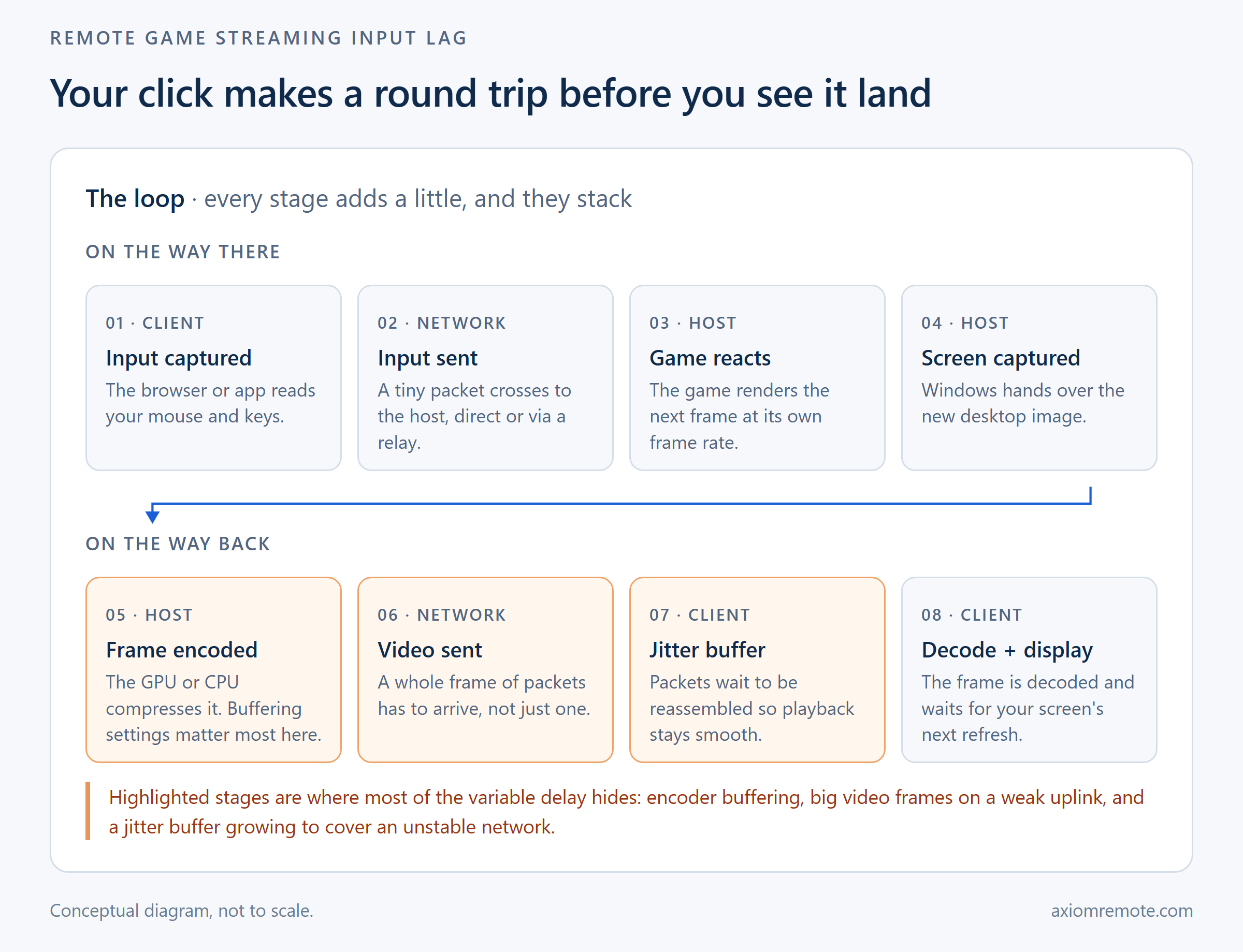
Why does a click feel slower when the game is streamed?
When you play on the PC in front of you, the trip is short. Your mouse talks to the computer, the game draws the frame, and the monitor shows it. Streaming takes that same trip and stretches it across the internet in both directions, and it adds two jobs that don't exist locally at all, which are turning every frame into compressed video and then turning it back into a picture on the other end. So even a perfect setup will always have some delay a local PC doesn't, and anybody who tells you it's literally zero is selling something.
But the delay you feel is almost never one giant thing. It's more like a relay race where every runner is a little slow, and the baton is your click. In my experience people blame their internet first, when the internet is often only one or two runners out of eight. This shows how the most useful question isn't "how fast is my connection," it's "which stage is the slow one," because that's the only thing you can actually go and fix.
What happens on the host PC before the video even leaves?
On Windows, most streaming tools grab the screen through the Desktop Duplication API. Microsoft's own documentation says it "provides remote access to a desktop image for collaboration scenarios," and it hands the app each new frame as a GPU surface, which means the image never has to be copied into normal memory before the encoder gets it. That's a big deal, because a copy into system memory and back is exactly the kind of quiet extra step that adds up. Microsoft also notes that the capture call only returns when Windows actually updates the desktop or the pointer, so the streaming tool is always waiting on the game to finish its frame first.
This means your host PC's own frame rate is the ceiling for everything after it. If the game is struggling to render, the stream can't fix that, because there's simply no new frame to send yet. One example is a laptop host on battery saver, where the game drops frames and the stream feels sluggish even though the network is completely fine. Before blaming the stream, it's worth checking that the game runs smoothly on the host itself.
How much does the video encoder add?
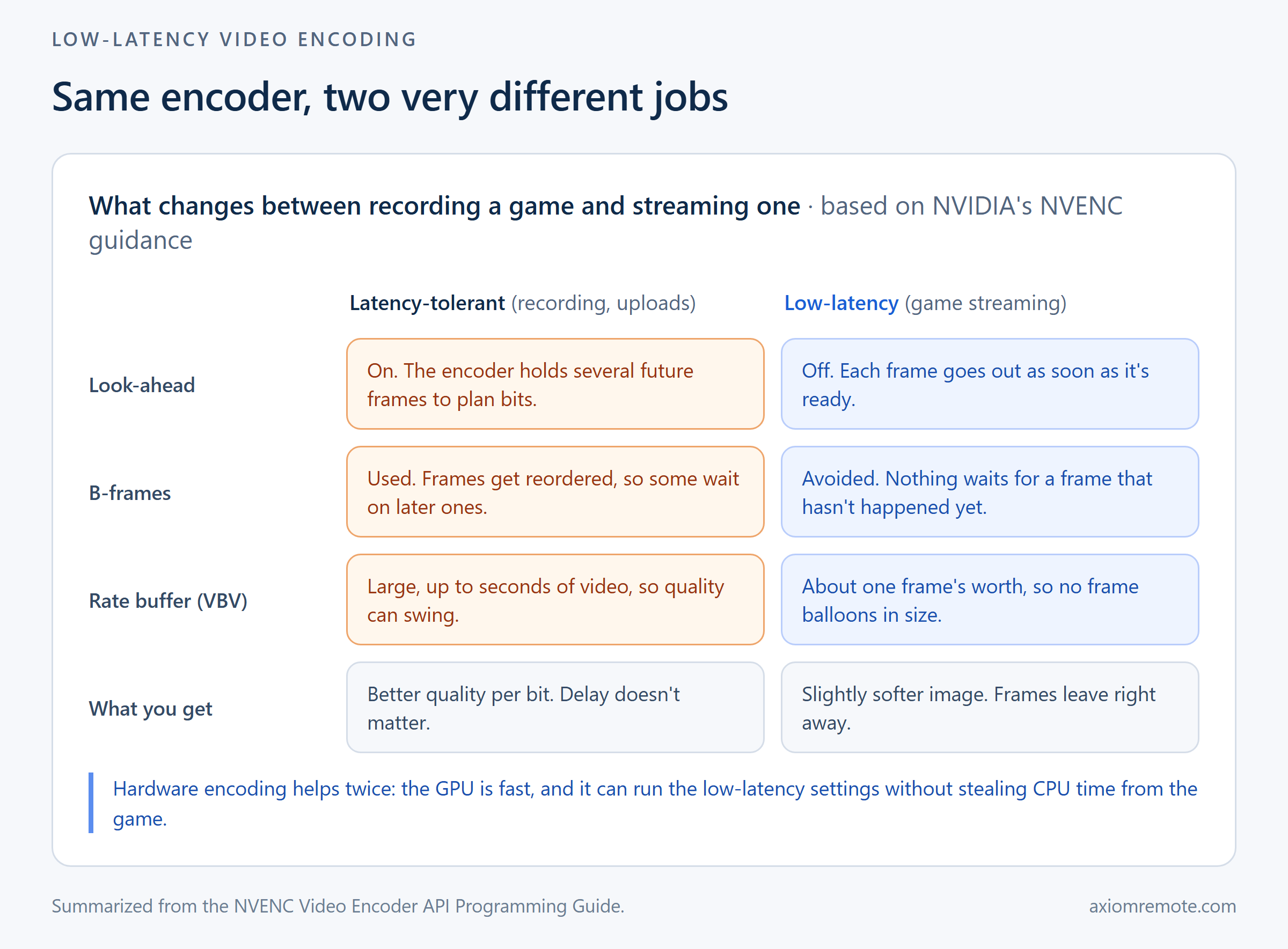
The encoder is where settings matter the most, because the exact same chip can be set up to wait a lot or barely at all. NVIDIA's NVENC programming guide splits its tuning into high quality, low latency, ultra-low latency and lossless, and it recommends the low-latency modes for cloud gaming. For low-latency use cases like game streaming, the guide recommends a "very low VBV buffer size (e.g. single frame = bitrate/framerate)" and says plainly to "avoid using B-frames." It also explains that with look-ahead turned on, frames get queued up inside the encoder until it has enough of them to plan ahead.
What this means for you is that a recording-style encoder is built to hold frames back so it can make the video look better, and that's the exact opposite of what a game needs. Holding a few future frames for look-ahead, or reordering frames for B-frames, is perfectly fine for a YouTube upload, but in a stream every held frame is delay you feel in your hands. A low-latency setup gives up a tiny bit of image quality so that each frame leaves the moment it's ready. Hardware encoding helps twice here, since the GPU is fast and it doesn't steal CPU time from the game, which is why we covered it in more depth in our post on hardware vs software encoding.
Why does the network add more lag than a speed test shows?
A speed test measures how much data fits through your connection and how long one tiny ping takes. Game streaming cares about something slightly different, which is how long it takes for a whole frame to arrive, and how steady that timing is. A single video frame is a burst of many packets, so a host with a weak upload can have a fine ping and still take a while to push each frame out, especially in busy scenes where frames get bigger. This is a clear example of why the home connection's upload matters more than the download on the device you're playing from.
The path matters too. A direct connection between the two devices is usually the shortest route, and a relay is a detour that only exists so the connection works at all when a network blocks the direct path. Distance also adds up, and even switching networks shows up, since in one informal test I measured about 10ms of added latency on a phone hotspot compared with home Wi-Fi. None of that is a disaster on its own, but it all lands on top of everything else in the chain.
What is a jitter buffer, and why does it make lag worse on Wi-Fi?
On the receiving side, the video doesn't go straight to the screen. It goes into a jitter buffer first, and the W3C WebRTC statistics spec describes its job as recombining packets into frames so the stream gets "smooth playout." Packets on a real network don't arrive in a neat line, they come in clumps, and the buffer holds them just long enough to put each frame back together in order. When the network is steady, that buffer can stay tiny.
Wi-Fi is where this goes wrong. Wireless connections tend to deliver packets in bursts, with little stalls when other devices talk or the signal dips, and the client responds by growing the buffer so the picture doesn't stutter. This shows how a shaky network turns into lag even when the average speed looks great, because the buffer is quietly trading delay for smoothness. If you only change one thing, plugging the host PC into Ethernet usually helps more than anything else, since it removes one whole wireless hop from the trip.
Why does my mouse lag when something else is happening?
This one surprises people. If your mouse and keyboard travel down the same pipe as everything else, then a big file copy or a clipboard paste can sit in front of your clicks, and they have to wait their turn. The game itself might be running perfectly, but your input is stuck in line behind a few hundred megabytes of somebody's vacation photos.
The fix is giving input its own lane so it never queues behind bulk data. That's how we built Axiom, where mouse and keyboard input travels on a dedicated low-latency channel separate from file transfers and other traffic. Whatever tool you use, the test is easy: start a large file transfer mid-game and see if your aim suddenly feels heavy. If it does, the problem isn't your network, it's how the tool is sharing it.
How do you figure out which stage is causing your lag?
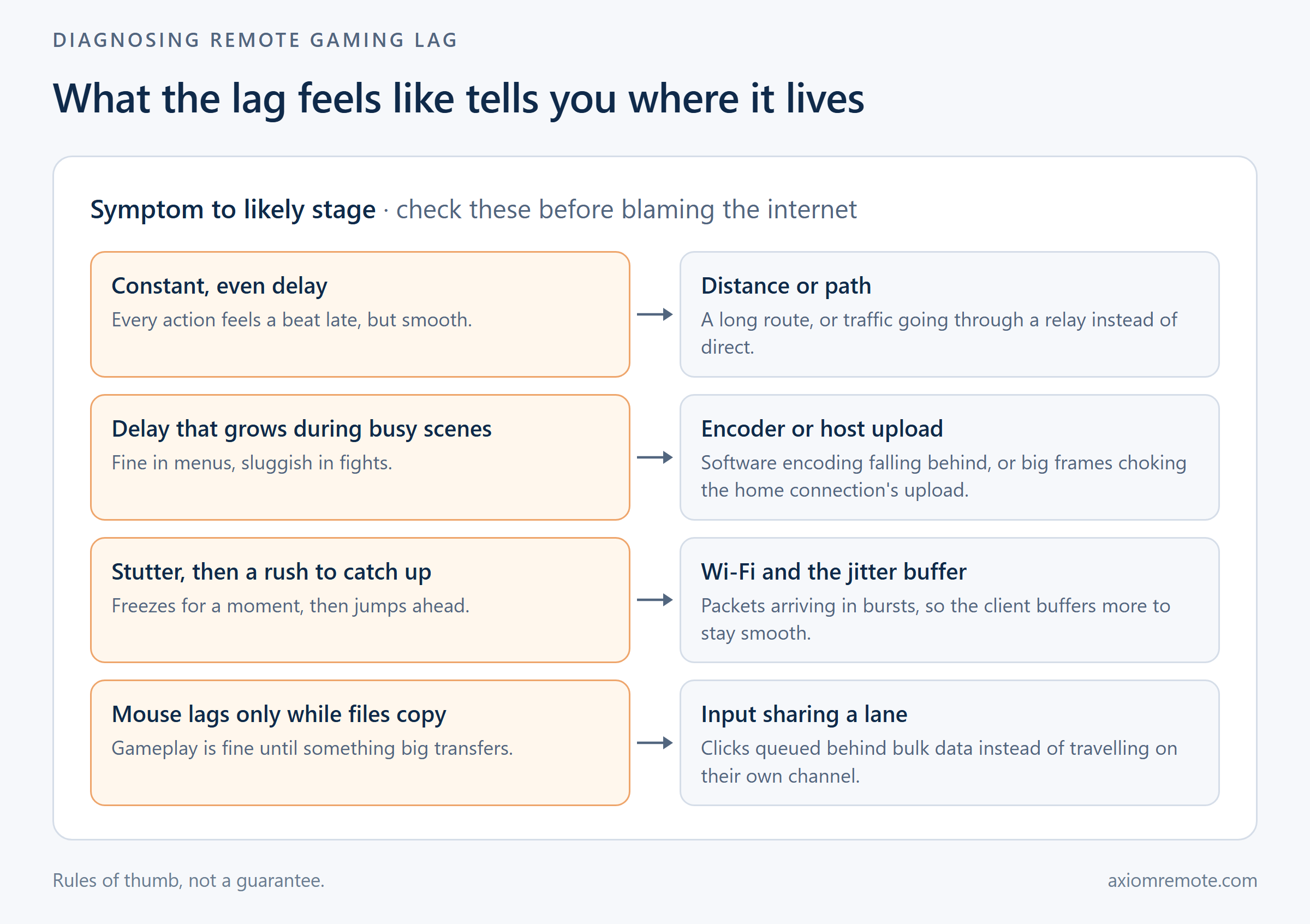
The way the lag feels tells you more than any number. A constant, even delay where everything is smooth but a beat late usually means distance or path, like traffic going through a relay instead of direct. Lag that gets worse in busy scenes points at the encoder or the host's upload, since that's exactly when frames get bigger. Stutters followed by a rush to catch up are almost always Wi-Fi and the jitter buffer, and lag that only shows up during file transfers means your input is sharing a lane.
Once you've matched the symptom, the fixes are pretty straightforward. Run the host wired, make sure it's encoding on the graphics card instead of the CPU, close whatever is eating the home upload, and check whether your session is going direct or through a relay. For the most part, you don't need a faster internet plan, you need to find the one slow runner and swap them out. Our page on remote desktop for gaming goes through what a setup built around this looks like.
Common questions
Is input lag in game streaming caused by my internet speed?
Sometimes, but usually not by speed alone. The lag comes from a chain that includes capturing the screen, encoding, the network trip, buffering, decoding and your display. A steady connection and enough upload headroom on the host matter more than a big download number, and encoder settings and Wi-Fi often add more delay than the raw connection does.
Does Ethernet reduce input lag when streaming games?
It usually helps, especially on the host PC. Wi-Fi tends to deliver packets in bursts, which makes the client grow its jitter buffer to keep the picture smooth, and that buffer is delay. Plugging the host into Ethernet removes one wireless hop and lets the buffer stay small.
Why is game streaming more laggy with software encoding?
Software encoding runs on the CPU, which the game also needs, so busy scenes can make the encoder fall behind and frames pile up. Hardware encoders like NVENC are fast, don't compete with the game for CPU time, and support low-latency settings like no look-ahead and no B-frames that let each frame leave as soon as it's ready.