
How Do You Remote Desktop from a Mac to a Windows PC?
Can you remote desktop from a Mac to a Windows PC? Yes, and the straightest path is Microsoft's own Windows App, free on the Mac App Store, talking to Windows's built-in Remote Desktop on the PC. The catch shows up fast: the PC on the receiving end has to be running Windows Pro, Enterprise, or Education, because Home edition can't accept a connection from anybody, Mac or otherwise. And once that's sorted, Windows App only finds the PC without a fight when both devices sit on the same network — reach it from a coffee shop or a different city and you're forwarding a port or standing up a VPN first. I've set this up on more Macs than I can count at this point, so here's the actual path, plus what breaks it.
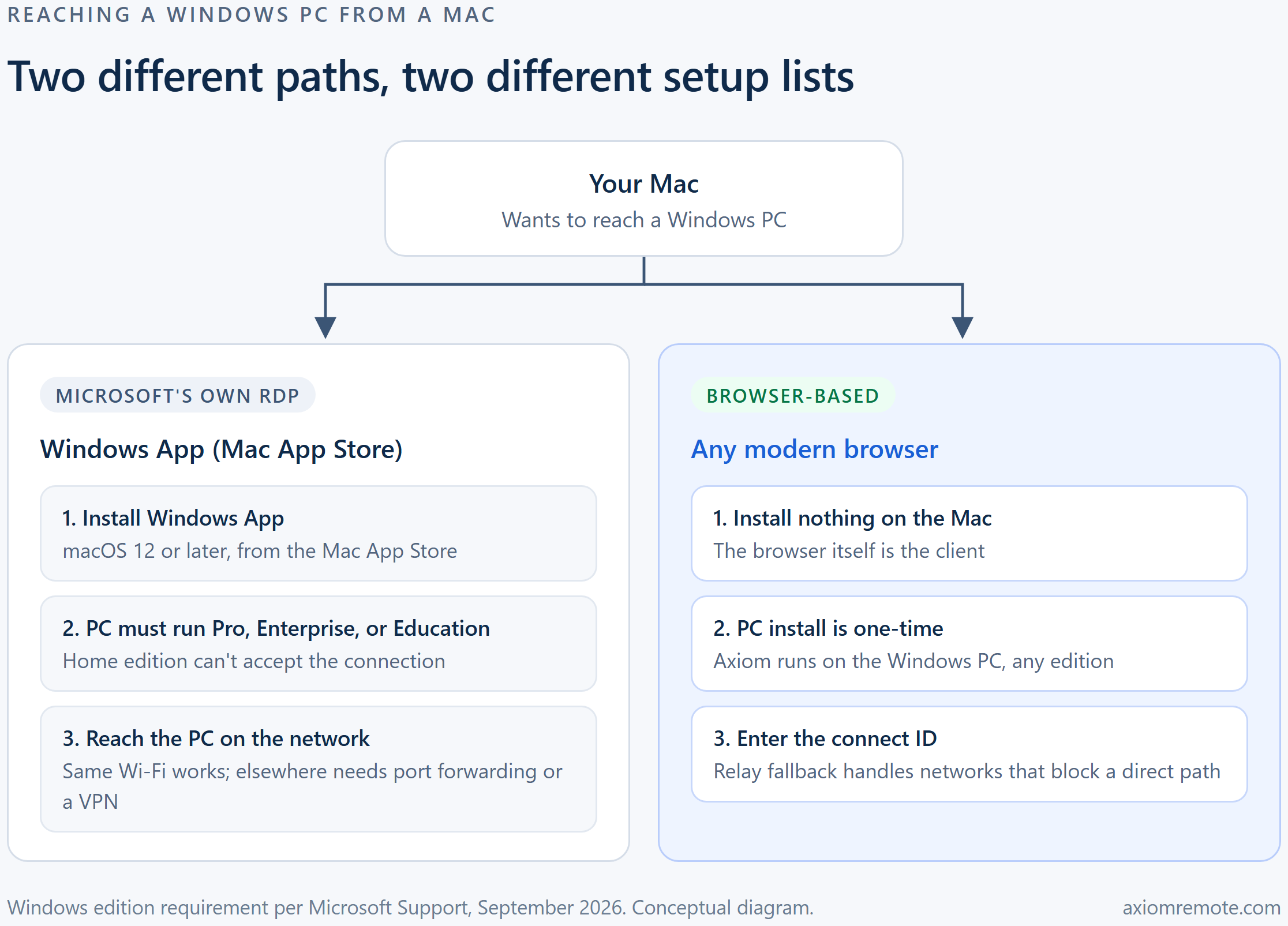
What do you actually need installed to make this work?
On the Mac side there's one app that matters: Windows App, Microsoft's current client, free on the Mac App Store and built for macOS 12 or later. It replaced the older Microsoft Remote Desktop app, which Microsoft pulled from listing, so if a guide you're reading points you at that name, download Windows App instead — same job, current name. Microsoft's own setup documentation lists what it needs beyond the install: internet access to grab it from the App Store, network connectivity to the PC you're reaching, and a user account on that PC to sign into once you connect.
On the Windows side, Remote Desktop is a feature you have to turn on yourself — it isn't on by default. That's Settings, then System, then Remote Desktop, where a single toggle switches it on and Windows confirms the change and shows you the PC name you'll need for the connection. Worth doing at the same time: check the PC's sleep settings, since a PC that's gone to sleep won't answer Windows App at all, and there's no error message that tells you that's the reason.
Once both sides are set, connecting is genuinely simple — open Windows App on the Mac, add the PC by name or IP address, sign in with an account on that PC, and you're looking at a Windows desktop inside a window. The work, such as it is, all happens before that first connection.
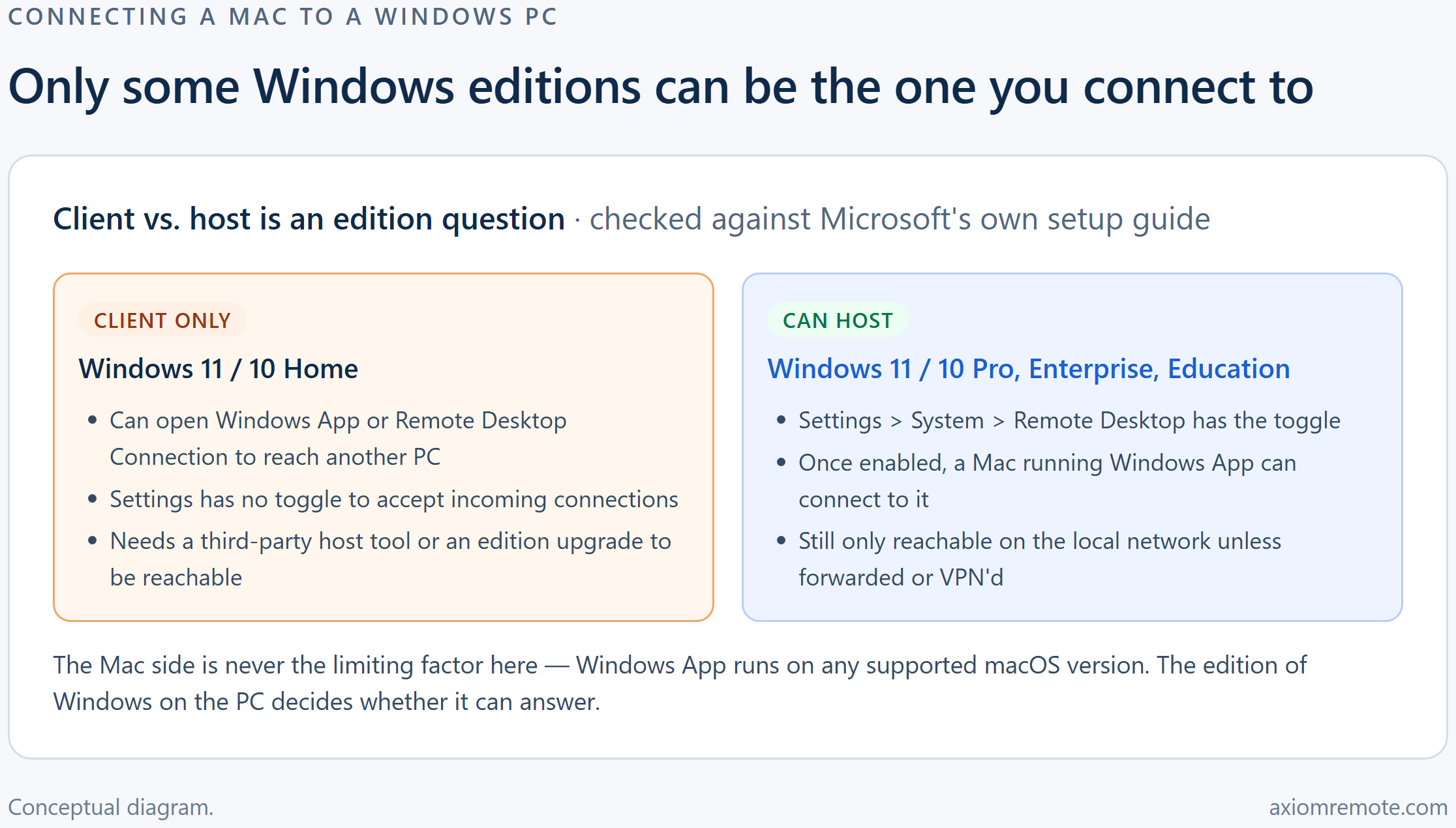
Why won't Windows Home let you connect to it?
This is the part that trips up more people than anything else, because it has nothing to do with the Mac at all. Microsoft's own support page is specific about it: "The PC you want to connect to (the remote PC) must be running Windows Pro edition." Home edition can use Windows App to reach other computers just fine — it just can't be the one being reached. There's no setting hiding somewhere in Home that turns this on; the feature simply isn't built into that edition.
That's a real problem in practice, because Home is what most prebuilt laptops and budget desktops ship with, and a lot of people don't find out their PC can't be reached until they're already standing somewhere else, trying to reach it. We've written a full walkthrough of what does and doesn't work on Windows 11 Home specifically if that's the PC you're stuck with.
There are two ways around it. One is to pay for a Windows Pro upgrade — it unlocks the feature immediately, no reinstall required. The other is to skip Microsoft's built-in Remote Desktop entirely and use a tool that runs its own host service instead, which is how things like Chrome Remote Desktop and Axiom sidestep the edition wall: they never touch the feature that's missing from Home in the first place.
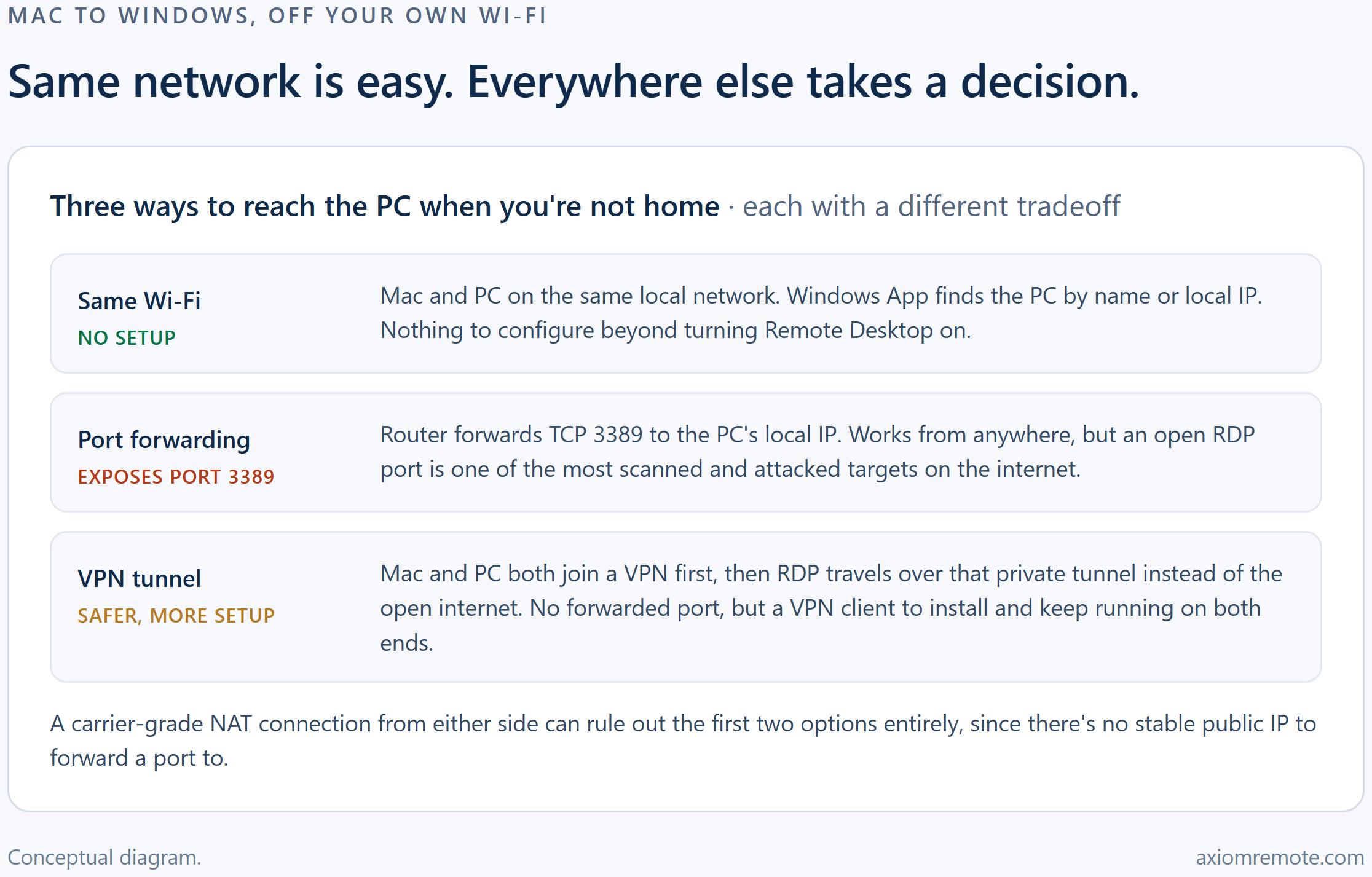
What if the PC isn't on your home network?
Windows App on the same Wi-Fi as the PC just works — it finds the machine by name, no extra setup. Leave that network and native RDP needs one of two things to reach the PC at all. The common one is port forwarding: your router forwards TCP port 3389 from your public IP straight to the PC's local address, and from then on the PC is reachable from anywhere.
It's also reachable by anyone else who goes looking. CISA's own guidance on routinely exploited security gaps calls out exposed Remote Desktop Protocol access as one of the weak controls attackers use most for initial network access, and the agency's blunt recommendation is not to expose RDP to the internet at all, or to add real compensating controls if you have to. A forwarded port 3389 is a well-known target, not a hidden one.
The safer option is a VPN: both the Mac and the PC join it first, and RDP traffic then rides inside that private tunnel instead of sitting on the open internet. It's a better security posture, but it's also a second piece of software to install, configure, and keep running on both ends, and if either device is behind carrier-grade NAT, port forwarding may not even be an option to begin with — there's no stable public IP to forward a port to.
Is Microsoft's client the only way in from a Mac?
No, and for a lot of people it isn't even the easiest one. Chrome Remote Desktop is the obvious alternative — it installs its own host service on the PC, so the Windows edition never comes into it, and connects from a browser tab rather than a separate Mac app. The tradeoff is that both machines need Chrome at some point, and it's built for occasional access more than daily driving.
Axiom takes a similar shape but drops the browser requirement down to just the Mac side. You install it once on the Windows PC — any edition, since it runs its own service rather than Windows's built-in RDP host — and from the Mac, any modern browser is the client. Nothing to download from the App Store, nothing to keep updated. When a network blocks a direct connection, sessions fall back to Axiom's relay servers automatically, the same way they would from behind CGNAT or a locked-down office Wi-Fi.
It's worth saying plainly that Axiom is still invite-only early access, and the host has to be a Windows PC — this isn't a way to remote into a Mac. But if the part of this whole process that's been the actual headache is the Pro-edition requirement or the port forwarding, that's specifically the part it's built to skip.
Common questions
Do I need to install anything on my Mac to remote desktop into a Windows PC?
With Microsoft's own tool, yes — Windows App, free on the Mac App Store, running macOS 12 or later. Browser-based tools like Chrome Remote Desktop or Axiom skip that install and use the Mac's browser itself as the client.
Does the Windows PC need to be Pro edition to accept a connection from a Mac?
For Microsoft's built-in Remote Desktop feature, yes — Microsoft's own support documentation states the remote PC must run Windows Pro edition, and Home can't accept incoming connections at all. Tools that run their own host service, like Chrome Remote Desktop or Axiom, don't have that requirement, since they never rely on Windows's built-in RDP host feature.
How do I connect from a Mac to a Windows PC that isn't on my home network?
Native RDP needs either a forwarded router port (TCP 3389, exposed to the whole internet) or a VPN connecting both devices first, and CISA specifically recommends against leaving RDP exposed without extra safeguards. Carrier-grade NAT can also rule out port forwarding entirely. Browser-based tools with a built-in relay fallback avoid that setup altogether.
Axiom
Skip the Windows edition wall entirely
Axiom installs once on the Windows PC — any edition, not just Pro — and any modern browser on your Mac is the client, with no port to forward. It's in invite-only early access; join the waitlist if a Mac-to-Windows connection is what you've been fighting with.