
What Is Wi-Fi Client Isolation, and Why Does It Break Remote Access?
Wi-Fi client isolation is a setting on the access point that blocks devices on the same wireless network from talking to each other directly, even though every one of them can still reach the internet just fine. It's on by default on a lot of guest, hotel, and campus networks, and it's the reason a laptop and a PC that are both connected to the exact same Wi-Fi, sometimes in the same room, still can't find each other for a remote desktop session. Nobody tells you this setting exists until it breaks something. This is that explanation, plus what actually gets you around it without needing the network admin's password.
What is Wi-Fi client isolation, and why do networks turn it on?
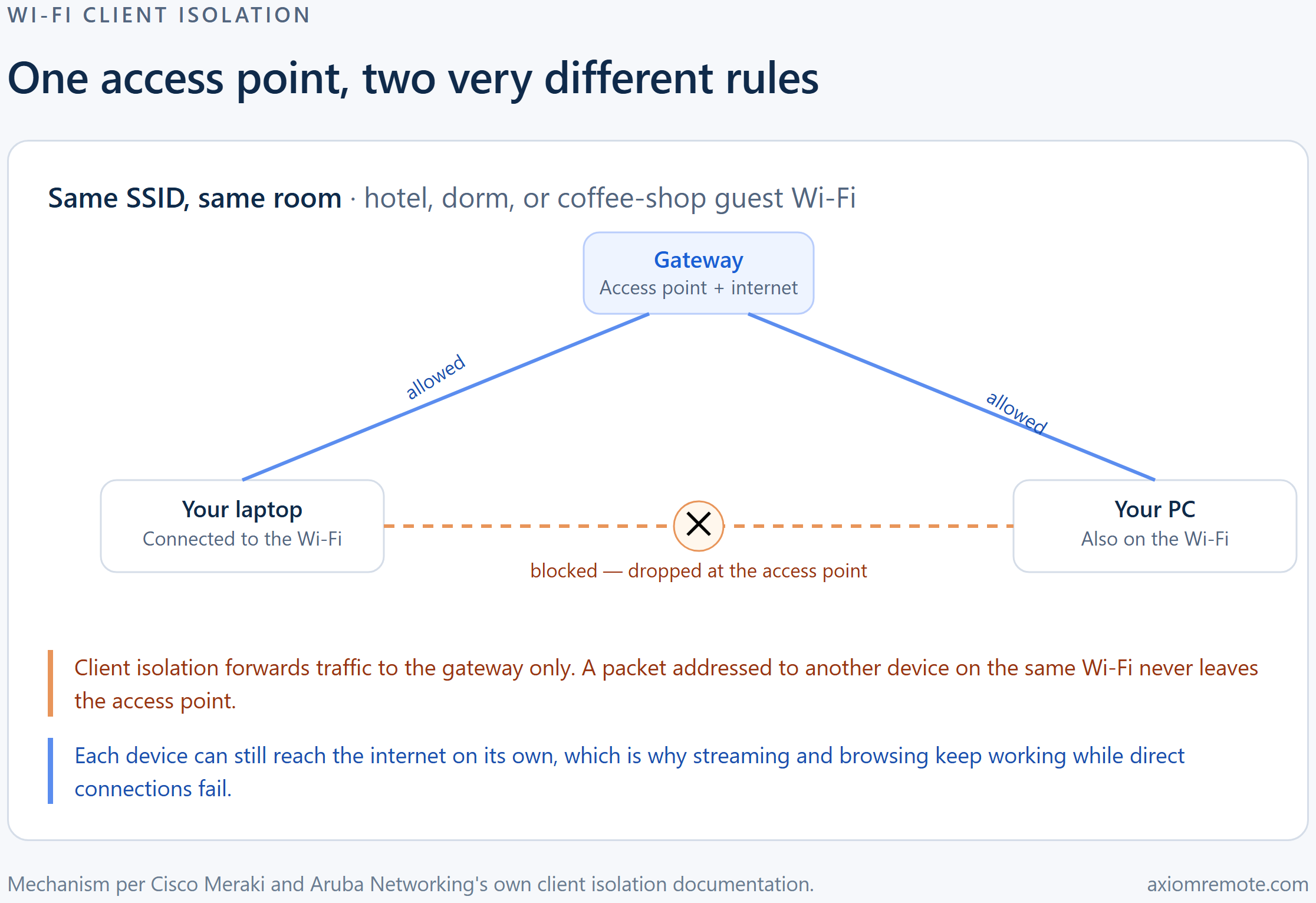
Client isolation is a feature built into nearly every commercial access point, and Cisco's own Meraki documentation describes it plainly: it's a security feature that prevents wireless clients from communicating with one another. Mechanically, once your device joins an isolated network, the access point learns the MAC address of the default gateway for your connection and enforces what amounts to a layer 2 firewall around you — traffic to that one address, the gateway, goes through, and everything else gets dropped before it ever reaches another device on the network. This shows how the access point isn't picky about which other device you're trying to reach. It doesn't matter if it's a stranger's laptop or the PC you personally own sitting three feet away. If the destination isn't the gateway, the traffic doesn't move.
Networks turn this on for a genuinely good reason, and it isn't about remote desktop at all. Aruba Networking's documentation on the same feature describes the identical mechanic from the vendor side: only client-to-gateway traffic is allowed to flow, and every other packet gets dropped at the access point. Hotels, campuses, coffee shops, and any guest Wi-Fi where the people sharing a network are strangers to each other all have the same underlying problem — without isolation, anyone on that Wi-Fi could probe, scan, or attack any other guest's laptop as if they were plugged into the same switch. Turning on client isolation is the fix, and it's a completely reasonable one. The awkward part is that it doesn't distinguish between a stranger's device and your own second device, which is exactly where remote desktop tools run into it.
Why does this break remote desktop even when you're one room away from your own PC?
Here's the scenario that trips people up. You bring a laptop to a dorm, a hotel room, or a coworking space, and your gaming PC or work desktop is already sitting there on the same Wi-Fi network. No CGNAT in the picture, no separate networks to bridge, nothing at your internet provider getting in the way — both devices are, as far as you can tell, already next to each other on the same access point. And the connection still won't go through. This is client isolation doing exactly what it was built to do, just to the wrong pair of devices.
What makes this particularly confusing is that everything else on both devices keeps working. Video streams fine on the laptop. Windows Update runs fine on the desktop. Neither device shows any error about the Wi-Fi itself, because as far as the access point is concerned, nothing is wrong — each device can still reach the one address it's allowed to talk to, the gateway, and from there out to the internet. This shows how the failure is narrow and specific: only the direct device-to-device path is cut, which happens to be exactly the path most remote desktop software tries first, since it's normally the fastest and lowest-latency option available.
How is this different from CGNAT or a blocked port?
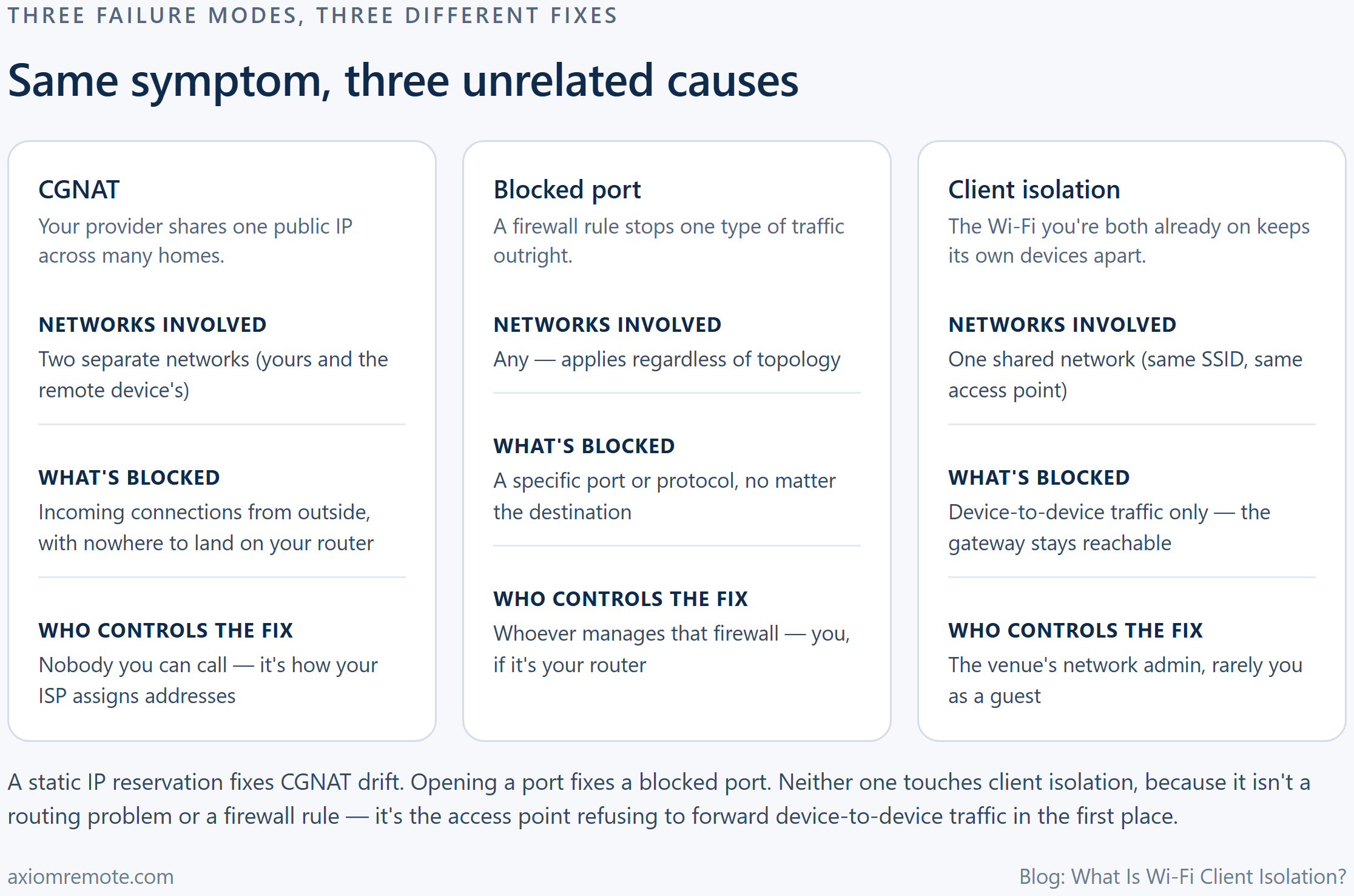
It's worth being precise here, because the fix for one of these problems does nothing for the other two, and mixing them up wastes a lot of troubleshooting time. CGNAT is a problem between separate networks — your internet provider shares one public address across many households, so an incoming connection from outside has nowhere obvious to land on your specific router. A blocked port is a rule, usually on a firewall, that stops one specific kind of traffic regardless of which network you're on. Client isolation is different from both: it only applies to devices already sharing the same access point, and it doesn't care about ports or protocols at all. It blocks the destination, not the traffic type.
This is why a static IP reservation, which fixes the CGNAT-adjacent problem of a home router's address changing, does nothing when the real issue is a hotel's guest Wi-Fi isolating you from your own second device on that same network. And it's why opening a port on your home router, which fixes certain blocked-port problems, doesn't help either when the two devices you're trying to connect are sitting on the same isolated SSID and never even leave the building. Three different failure modes, three different fixes, and only one of them, client isolation, has nothing to do with your own network configuration at all.
How do you tell client isolation is actually the problem?
The clearest signal is the internet-works-but-devices-don't pattern from the last section: both devices browse normally, but anything that depends on finding another device on the local network quietly fails. That's not limited to remote desktop tools. Aruba's own documentation on the feature notes, as a known side effect, that it affects Chromecast and AirPlay, both of which depend on one device discovering another on the same local network, the exact path client isolation is built to cut. This shows how, if you've ever been on hotel or airport Wi-Fi and couldn't cast a video to a room TV, you were looking at the same setting from a different angle.
A second signal is who controls the network. Client isolation is configured on the access point itself, which makes it the hotel's, the campus's, or the coffee shop's setting to change, not yours. If you're on your own home Wi-Fi and two of your own devices can't see each other, that's unlikely to be client isolation and much more likely to be a router setting worth checking. But the moment you're a guest on someone else's network, with no login to their admin panel, isolation becomes the most likely explanation for a device-to-device connection that refuses to start.
How do you get around Wi-Fi client isolation without asking IT?
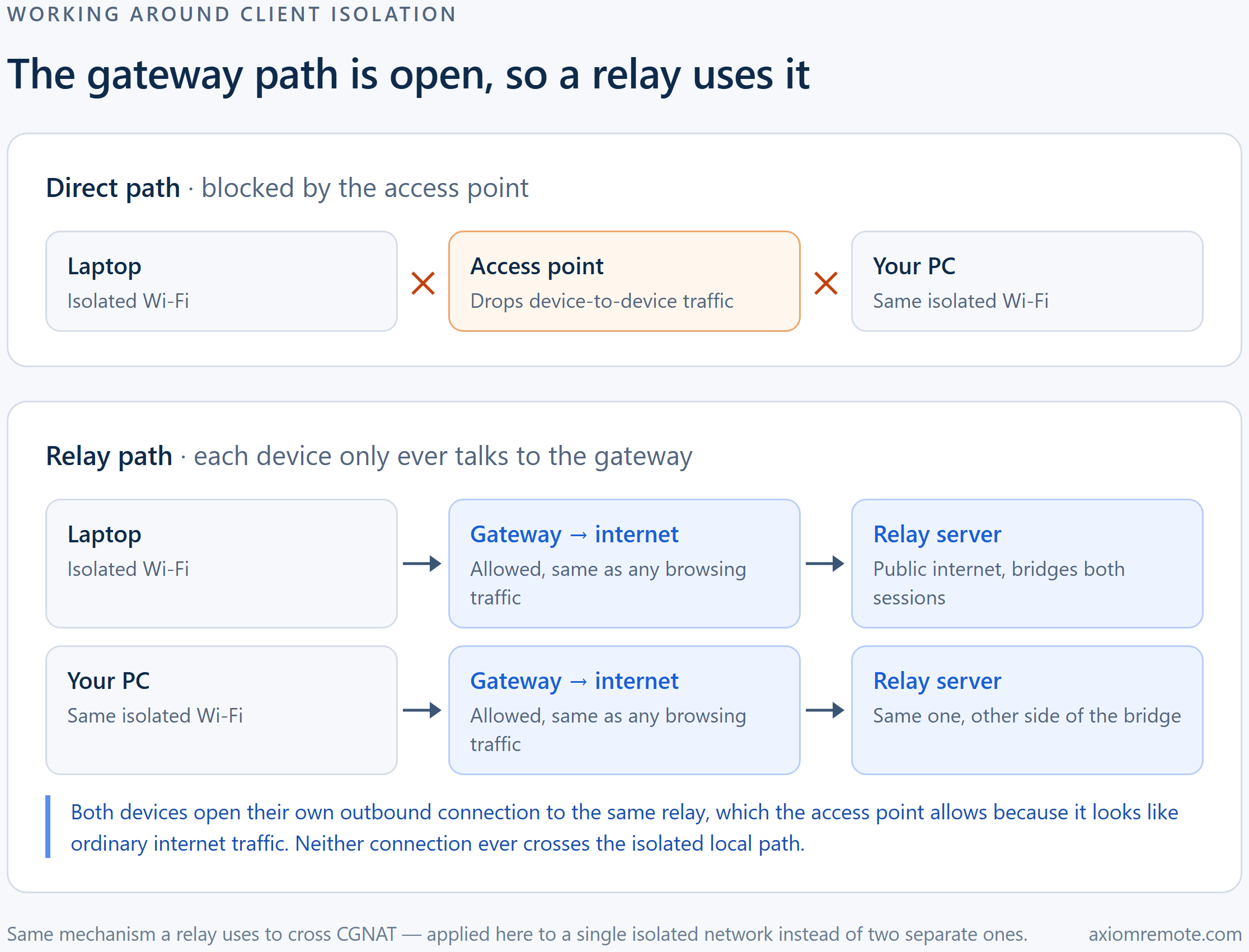
Since you can't turn the setting off from a guest account, the only real fix is routing around it rather than through it. The workaround is almost elegant once you see the mechanism: client isolation blocks device-to-device traffic, but it still allows both devices to reach the gateway and, from there, the open internet. So if both devices independently open an outbound connection to the same server sitting out on the public internet, that server can bridge the two of them, and neither connection ever has to cross the local, isolated path the access point is watching. This is the same relay mechanism that gets remote desktop tools through CGNAT, just solving a different problem. There, a relay works around two separate networks that can't see each other. Here, it works around one network that's deliberately keeping its own devices apart.
This is exactly the fallback Axiom uses. It attempts a direct connection first whenever a network allows it, and falls back automatically to Axiom's relay servers when the direct path is blocked, whether that's strict Wi-Fi, a hotel, a campus, or CGNAT. No port forwarding or router configuration is required on either end, which matters a lot here specifically, since you're a guest with no access to the hotel or campus router in the first place. You install Axiom once on the PC you're leaving behind, it gets a short numeric ID, and you reach it later from any modern browser, on that same isolated Wi-Fi or a completely different network, without needing to diagnose which failure mode you're dealing with.
Common questions
Can I turn off Wi-Fi client isolation myself?
Not on a network you don't administer. Client isolation is a setting on the access point, so on hotel, campus, or coffee shop Wi-Fi it's controlled by whoever runs that network, not by an individual device connected to it. The practical fix on the guest side is a tool that routes around the block with a relay server instead of waiting for IT to change a setting.
Why can I use the internet but not reach my own PC on the same Wi-Fi?
Because client isolation only blocks device-to-device traffic. It specifically allows each device to keep talking to the gateway and, through it, the internet. Cisco Meraki's documentation describes the mechanism as a layer 2 firewall that permits gateway traffic and drops everything else, which is exactly the internet-works-but-devices-don't pattern this setting causes.
Does Wi-Fi client isolation affect anything besides remote desktop?
Yes. Anything that depends on one device discovering another on the same local network runs into the same wall, which is why Aruba Networking's documentation on the feature specifically calls out Chromecast and AirPlay as affected. If casting to a hotel TV or a dorm speaker has ever mysteriously failed, that's usually the same setting.
Axiom
Stop guessing which network setting broke your connection
Axiom checks for a direct path first and falls back to a relay server automatically the moment a network blocks it, whether that's client isolation on a hotel guest network, CGNAT at home, or a campus firewall. It's in invite-only early access; join the waitlist to try it on your own dorm or hotel Wi-Fi.