What Is CGNAT, and Why Does It Break Remote Access?
Why would port forwarding work perfectly for one person and do absolutely nothing for another, with the same router and the same settings? More and more often, the answer is carrier-grade NAT, or CGNAT. It's a second layer of address sharing that your internet provider runs upstream of your router, and it means your home no longer has its own public address on the internet. You can't configure your way around it on your own router, but you can absolutely work around it, and the options range from a phone call to your provider to remote access software that never needed an open port in the first place.
What is NAT, and what makes CGNAT different?
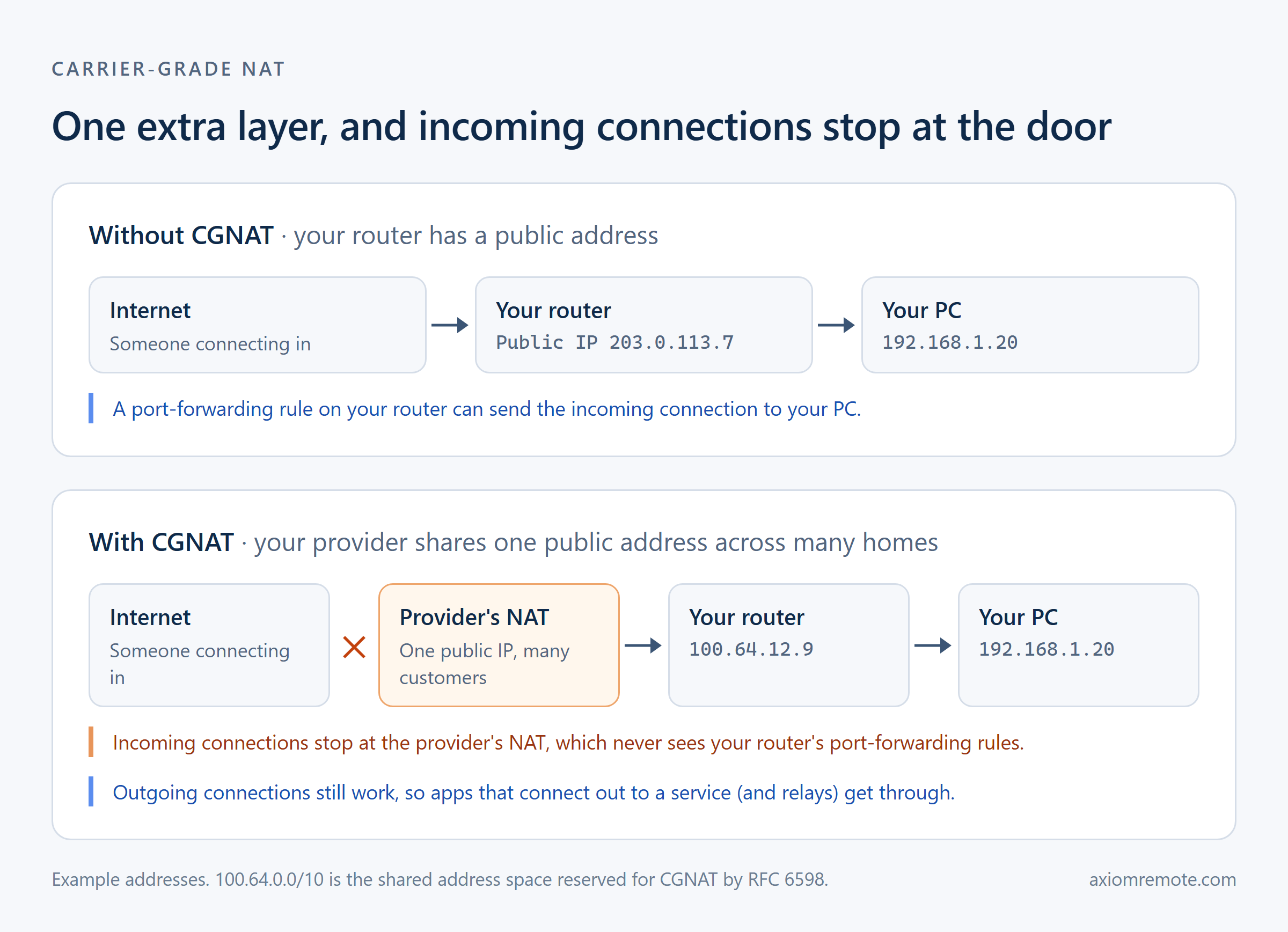
Your home router already does NAT, network address translation, every day. Your PC, phone, and TV each get a private address like 192.168.1.20, and the router shares the one public address from your provider among all of them. When your PC loads a website, the router swaps in the public address on the way out and remembers who asked, so the reply comes back to the right device. That's why a whole house can share one connection, and it's a big part of why the internet didn't run out of IPv4 addresses years ago.
CGNAT is the same trick done a second time, by your provider. Instead of giving your router a public address, the provider gives it a private one and shares a smaller pool of public addresses across many customers. There's even an address range set aside for it: RFC 6598 reserves 100.64.0.0/10 as shared address space for the link between customer routers and a carrier's NAT (RFC 6598).
Think of it like an apartment building with one street address. Your router is your apartment's front door, but the building has a front desk you don't control, and a visitor who only knows the street address has no idea which door is yours.
Why does CGNAT break port forwarding and remote access?
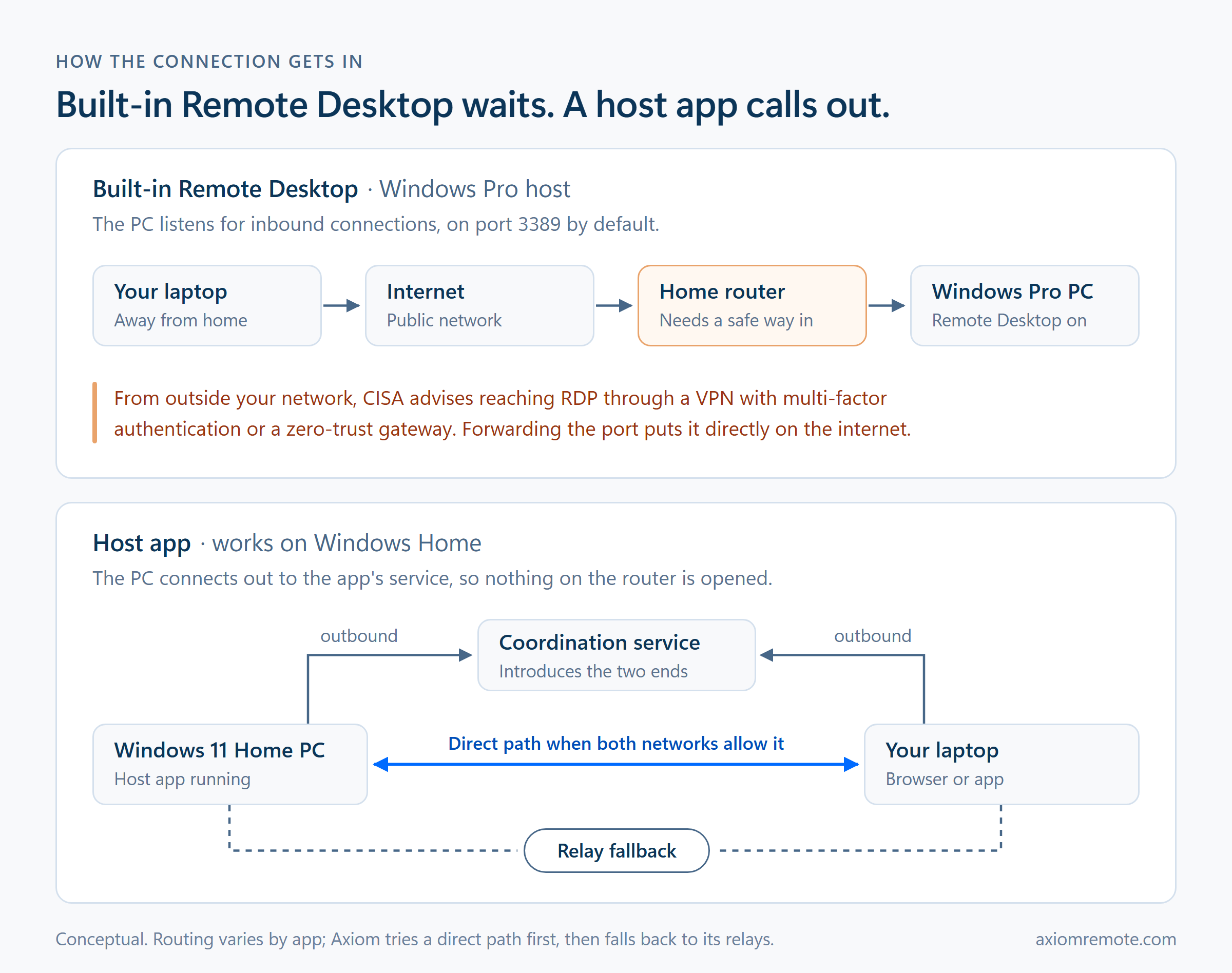
Traditional remote access waits for someone to knock. Microsoft's Remote Desktop, for example, listens for incoming connections, so reaching it from outside means forwarding a port on your router to the PC. That only works if your router has a public address the internet can reach. With CGNAT, the knock lands at the provider's front desk first, and the front desk has never heard of your port-forwarding rule. The connection attempt goes nowhere, and no setting on your router can change that.
Direct connections that skip port forwarding can struggle too. Many modern tools use a technique called hole punching, where both devices reach out at the same time so each NAT lets the other's traffic back in. It depends on the NAT reusing the same outside address and port for a device no matter who it's talking to, which the standards call endpoint-independent mapping. RFC 4787 requires it (RFC 4787), and RFC 6888 says carrier-grade NATs must follow those same behavioral rules (RFC 6888). Not every network lives up to that, though. When a NAT hands out a different outside port for every destination, which people often call symmetric NAT, hole punching fails and a direct path can't be built.
This shows how the only connection that reliably works through CGNAT is one that starts from the inside. Outbound connections are exactly what NAT was built for, so a PC that reaches out to a service gets through even when nothing can reach in.
How can you tell if you're behind CGNAT?
You can check in about a minute. Open your router's admin page and find the WAN or internet address it got from your provider. Then look up your public address on any what's-my-IP site. If the two match, you're not behind CGNAT. If the router's address is different, and especially if it falls between 100.64.0.0 and 100.127.255.255, your provider is sharing a public address across its customers.
One caveat: if you have two routers at home, like a provider's modem-router with your own router behind it, the inner router will show a private address even without CGNAT. Check the address on the device that actually connects to your provider.
Two more ways to confirm CGNAT
If the address check leaves you unsure, a traceroute shows the layers directly. Open a command prompt and run tracert 8.8.8.8 on Windows, or traceroute 8.8.8.8 on a Mac. The first hop is your own router, usually an address like 192.168.1.1. If the second hop is an address between 100.64.0.0 and 100.127.255.255, that's your provider's CGNAT sitting one step past your router.
The other sign is a forwarded port that never opens. Set up a rule on your router, then test it with an online port-check tool while the service is running on your PC. If the rule is correct and the port still shows closed from outside, and your router's WAN address didn't match your public one, the port isn't being blocked by your router at all. It never reaches it.
What can you do about CGNAT?
The simplest fix is asking your provider for a public IPv4 address. Some providers give one for free on request, some charge a small monthly fee, and some only offer it on business plans. With a public address, your router is reachable again and normal port forwarding works, although that brings back the security trade-offs of opening a port, which we cover in port forwarding explained.
IPv6 is the long-term answer. With IPv6, every device can have its own globally reachable address, so there's no shared front desk in the way. It works well when your provider, your router, and the network you're connecting from all support it, but you can't count on hotel Wi-Fi or a phone hotspot to have it.
Mesh VPNs are another route. Tools such as Tailscale connect your devices into a private network that gets through hard NATs, falling back to relay servers when a direct path fails (Tailscale). They work well, but they mean installing and running another app on every device you connect from.
The last option is remote access software that uses relay servers. Many remote desktop tools try a direct connection first and fall back to a relay, a server that both devices connect out to, when a direct path can't be built. Because both connections start from the inside, it works through CGNAT without changing anything at home. The trade-off is an extra hop, which can add a little delay compared with a direct connection. We explain the idea in what is a relay server.
Here's how the options compare:
| Option | Cost | Effort | Works from anywhere |
|---|---|---|---|
| Ask for a public IPv4 address | Free to a monthly fee | One support call | Yes, but you're back to opening a port |
| IPv6 | Free | Depends on your provider and the network you connect from | Only if both ends have it |
| Mesh VPN | Often a free tier | Install on every device | Yes |
| Rent a server and tunnel to it | A small monthly fee | High | Yes |
| Remote access software that connects out, with a relay | Varies | Install on the PC only | Yes |
What else does CGNAT break?
Remote desktop isn't the only thing that stops working. Anything that needs the internet to reach into your home does too: a game server for friends, a media server like Plex, a home camera you want to view away from home. The workaround depends on the job. For reaching your own PC, and for playing games on a home PC from another room or another city, software that connects out is the simple route, and we cover the gaming case in remote desktop for gaming.
How Axiom handles CGNAT
Axiom was built with the apartment building in mind. You install the host once on the Windows PC, and it connects out to Axiom's service instead of waiting for someone to knock, so there's no port to forward and nothing to change on your router. When you connect from a browser with the PC's short connect ID and access password, Axiom tries a direct connection first. When CGNAT, a strict firewall, or a hotel network blocks it, the session moves to Axiom's relay servers automatically, and it's encrypted either way.
Strict networks do cost a little. In an informal test in July 2026, with a Windows gaming PC host and a browser client on the same laptop, I saw about 10ms of added latency on a US mobile hotspot compared with home Wi-Fi. For most remote work that's small. CGNAT isn't going away while IPv4 is still around, so the tools that keep working are the ones that never needed a door facing the street.
Common questions
How do I know if my ISP uses CGNAT?
Compare the WAN address on your router with your public address from a what's-my-IP site. If they differ, especially if the router shows an address between 100.64.0.0 and 100.127.255.255, you're likely behind CGNAT.
Can I port forward behind CGNAT?
Not in a way that works from the internet. Your router's rules are invisible to your provider's NAT upstream. You'd need a public IPv4 address from your provider, working IPv6, or a tool that connects out instead.
Is CGNAT a security risk?
Not much of one for you. It blocks unsolicited incoming connections, which is a side benefit, but it doesn't replace a firewall or good passwords. The main downsides are that you can't host anything that needs incoming connections, and sharing an address with other customers can mean inheriting their reputation, such as extra CAPTCHAs.
Does Axiom work behind CGNAT?
Yes. Axiom's host connects out, so nothing needs to reach in. It tries a direct connection first and uses its relay servers automatically when CGNAT or a strict network blocks the direct path.
Is CGNAT the same as double NAT?
They're related but not identical. Double NAT means your traffic passes through two NAT devices, such as your own router behind a provider's modem-router. CGNAT is a specific case where the second layer belongs to your provider and you can't configure it. You can often fix double NAT at home, but not CGNAT.
Does IPv6 get around CGNAT?
Yes, when both ends support it. IPv6 gives each device its own globally reachable address, so there's no shared address to get stuck behind. The catch is that the network you're connecting from also needs IPv6, and hotel Wi-Fi and phone hotspots often don't have it.
How do I get out of CGNAT?
Ask your provider for a public IPv4 address, which some give for free and some charge for, or use IPv6 if you both have it. If neither is an option, use a tool that connects out from your PC to a relay instead, which works without changing anything at home.
Axiom
Tired of network headaches? Axiom handles the hard part.
Axiom makes remote desktop easy, automatically getting around tough network restrictions like CGNAT. Join the early access program and see how simple remote control can be. Just because you weren't born with fiber internet doesn't mean there's no point trying — it just means you pick the tool that does the work for you.